Split a Large XML File into Records
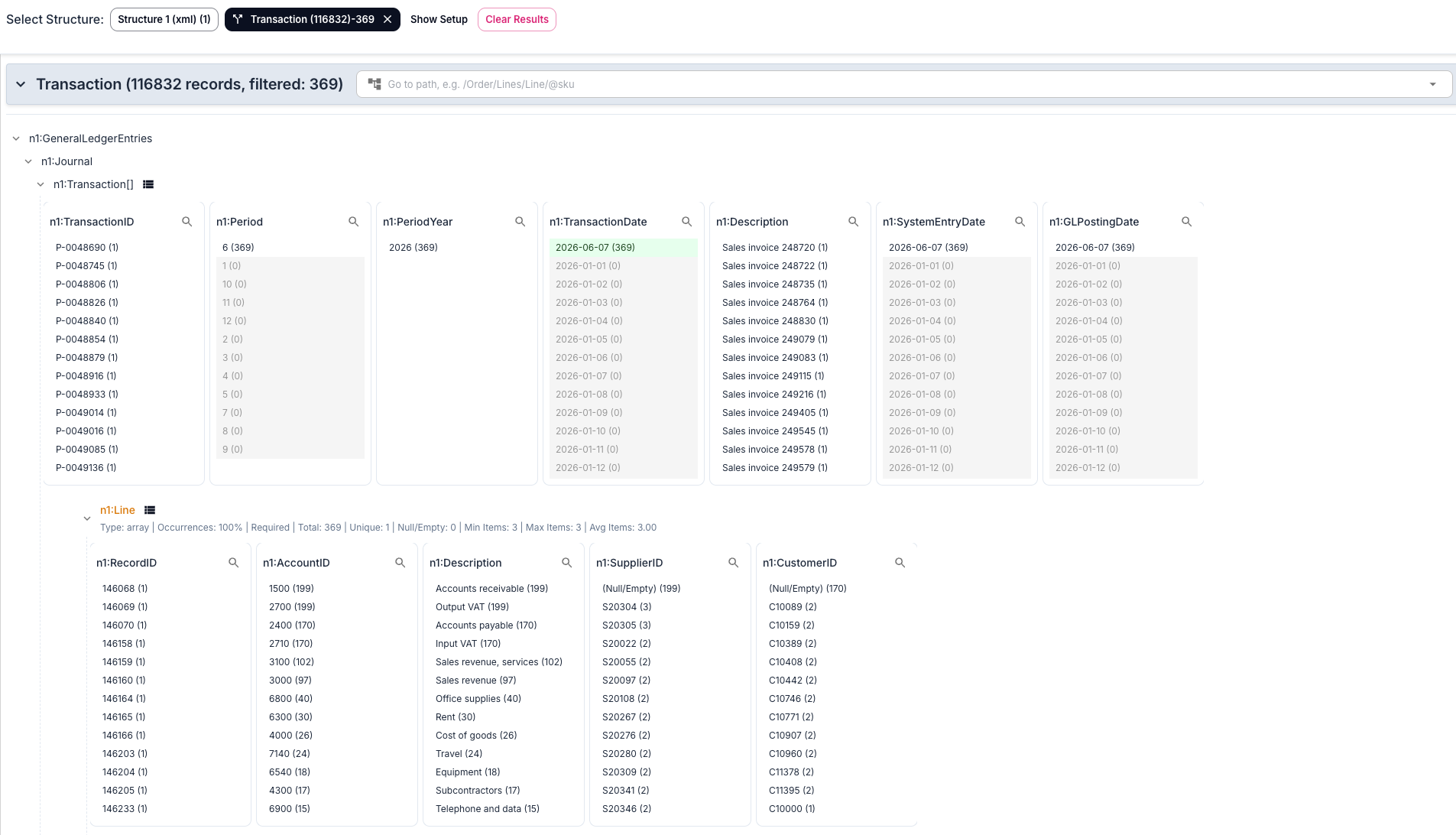
One file, a hundred thousand transactions, and you need the 369 from one day. Pick the list to split on, filter the records by clicking values, and export the ones that match as XML files of their own or as a ZIP.
- Your files never leave your browser
- Free, no account needed to start
- Nothing to install
Your files never leave your browser
The file you need to split is usually a full export: a ledger, a register, an order history. Uploading it to an online splitter means handing all of it over to get a small part back.
Nodeflip reads, parses and analyzes your files with code that runs in your own browser. The files are not uploaded to a server, so there is no copy of them anywhere else to secure, delete or explain to a customer. That makes it usable when you are not allowed to paste customer data into an AI service or upload it to an online tool.
What the app does send: anonymous usage statistics (file type and file size, never file names or content) and error reports. More about local processing.
Split on a list, keep what you need
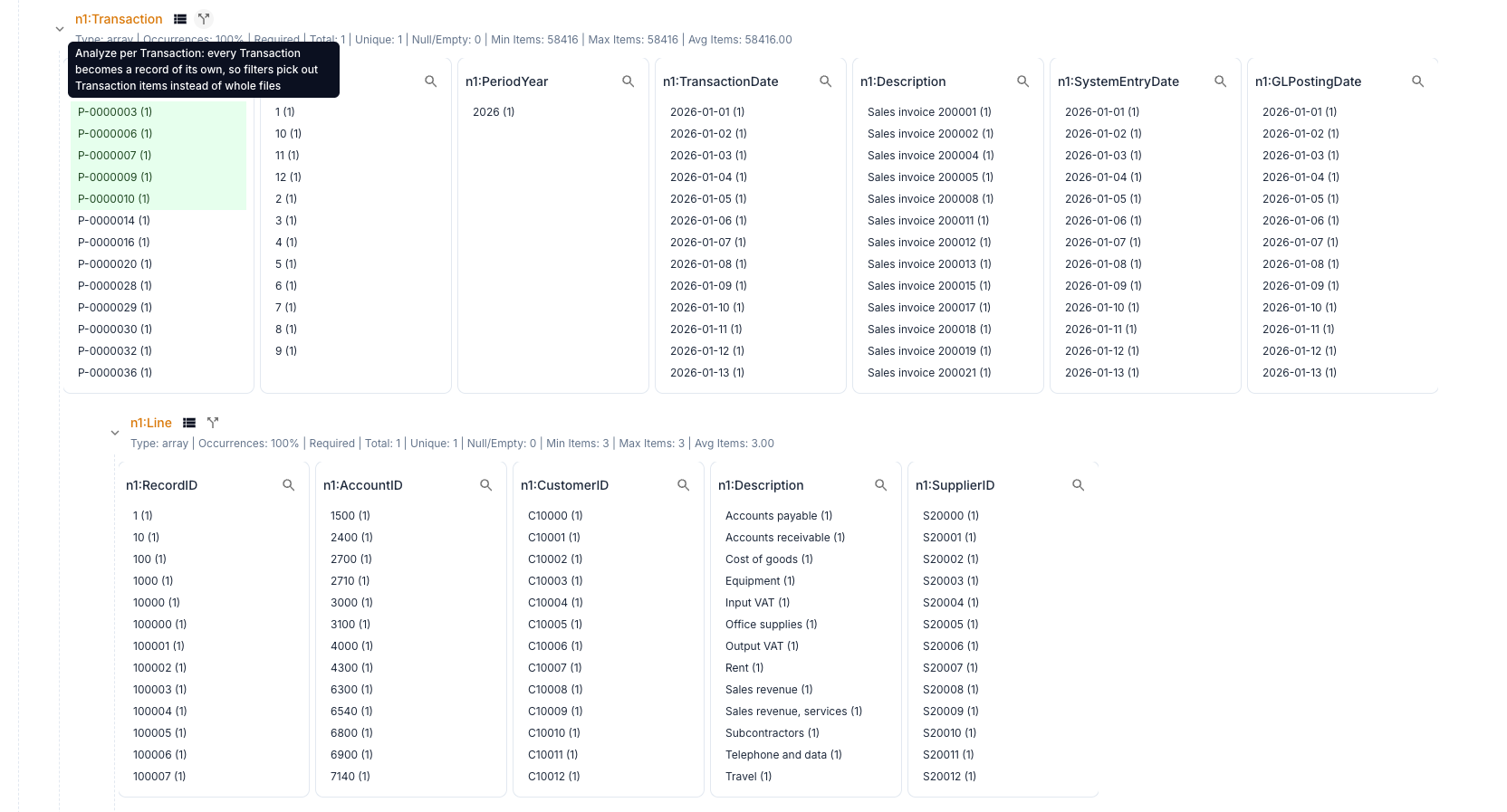
Every item becomes a record
After the analysis, each list of elements in the file has a split icon. Click it and the items of that list become records: one per transaction, order or invoice line. Every field of the records gets a list of its values with counts, and one click on a value filters all the other fields to the records that match.
- Split on any list of elements, or any array of objects in JSON
- Combine filters: one date, one account, one customer
- Values selected before the split are still selected after it
- The file itself is left as it is
Export the records that match
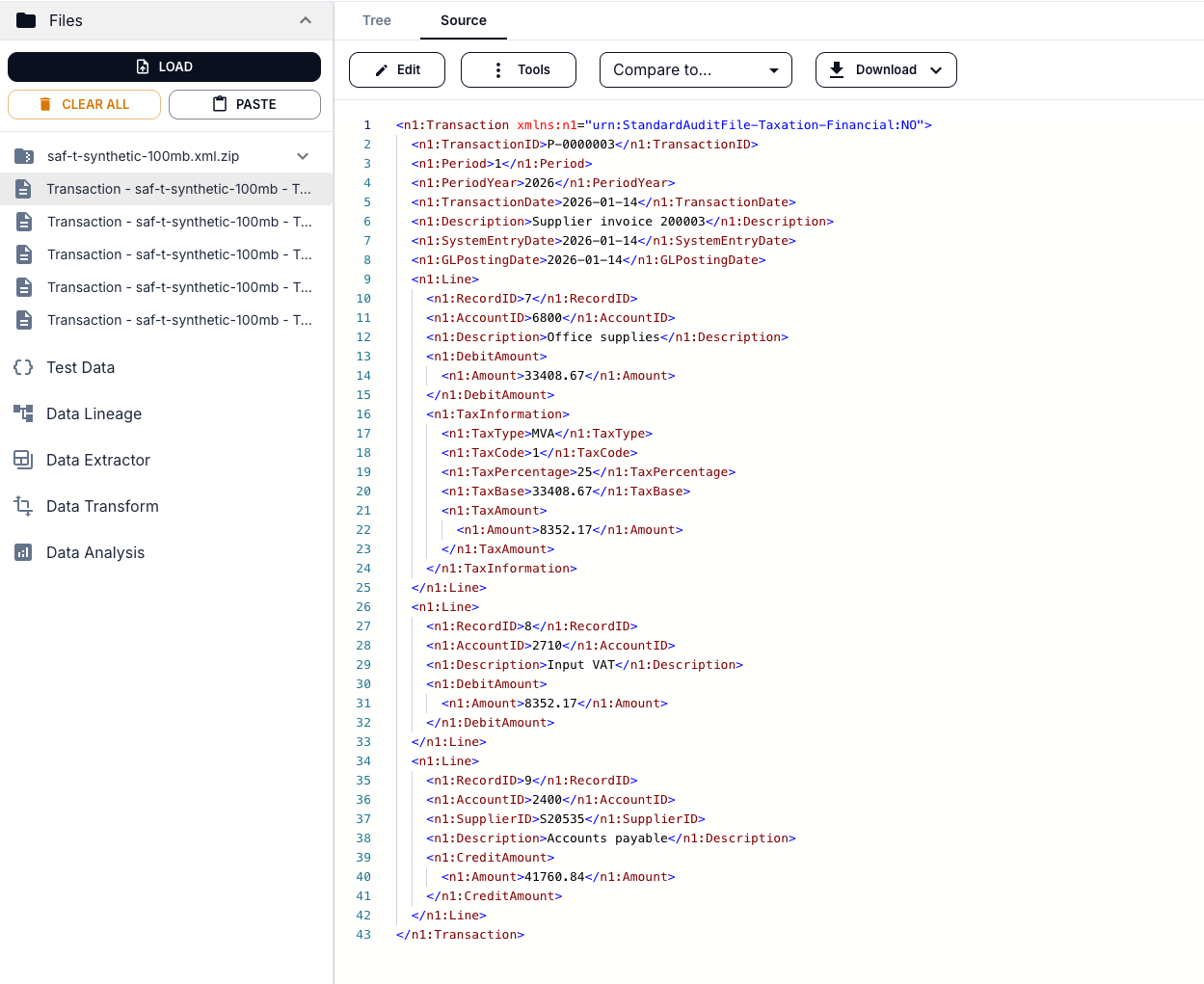
The export menu works on the records that the filters have left. Each record is written as the element stands in the file, with the namespaces it uses declared on it, so every exported file is a complete XML document.
- Extract Files: each record as a file in the Files menu, where the limit of two files without registering applies
- Extract into zip: the records as one ZIP in the Files menu
- Download as zip: the ZIP saved to your computer
- Open one record, or compare two side by side
Why an XML file cannot simply be cut in pieces
A text file can be split after every thousandth line. An XML file cannot, for three reasons.
- Every piece needs a root. A document has exactly one root element. Cut a file in the middle and the first piece lacks its end tags, the second its start tags, and neither is well-formed.
- Namespaces are declared at the top. A prefix such as
n1:is usually declared once, on the root element. A record that is lifted out without that declaration is not valid XML. - Lines mean nothing. Many files are written as one long line, and an element can span any number of lines. Splitting has to follow the elements.
So a split has to be done by something that reads the XML: it finds the repeating element, and writes each one out with the declarations it needs.
<n1:Transaction xmlns:n1="urn:StandardAuditFile-Taxation-Financial:NO">
  <n1:TransactionID>P-0000003</n1:TransactionID>
  <n1:TransactionDate>2026-01-14</n1:TransactionDate>
  <n1:Line>...</n1:Line>
</n1:Transaction>
Ways to do it
| Method | Good for | Keep in mind |
|---|---|---|
XSLT 2.0 or 3.0 with xsl:result-document | A split that is run again and again, with rules for what goes where | You write and maintain a stylesheet, and an ordinary processor holds the whole document in memory |
A streaming parser in code, such as StAX in Java or iterparse in Python | Files of many gigabytes | It is a program to write, and namespaces are yours to handle |
| Nodeflip | Finding out which records you need, and taking those out, without writing anything | Runs in your browser, so the size is limited by your memory |
What Nodeflip does and does not do
- It selects, then splits. You filter the records first and export the ones that are left. To export every record, export without a filter.
- One record per file. Each exported file holds one record. Nodeflip does not write pieces of a thousand records each.
- Size. In our own test a synthetic audit file of 200 MB with close to 117,000 transactions, loaded as a ZIP, was split and filtered per transaction. A file of 500 MB was too much for the browser. For files of that size, use a streaming tool.
- Several files at once. With many files loaded, the items of all of them become records, for example every invoice line of a month of invoices.
To run a stylesheet of your own over the file instead, see the XSLT tester.
How to split an XML file in Nodeflip
-
Load the file
Open Nodeflip and drag the file onto the Files menu, or click LOAD. Zip a large file first and load the ZIP.
-
Run the analysis
Open Data Analysis, select the file and run the analysis. The structure of the file is shown as a tree.
-
Choose the list to split on
Find the list whose items you want, for example
Transaction, and click the split icon next to its name. Its tooltip says Analyze per Transaction. -
Filter the records
Click a value, such as a date or a customer, to keep the records that have it. Click more values to narrow it down.
-
Export
Open the export menu and choose Extract Files, Extract into zip or Download as zip.
No file at hand? Open a small synthetic audit file in Nodeflip
Questions and answers
Can I split a file into pieces of a fixed size?
No. Nodeflip splits on the items of a list and writes one record per file. It is made for taking out the records you need, not for cutting a file into equal parts.
Are the exported files valid XML?
Each one is well-formed: the record is written as it stands in the file, with the namespaces it uses declared on it. Whether it is valid against a schema depends on the schema, since a record is not the whole document that the schema describes.
How large a file can I split?
It depends on the memory of your computer. In our own test a 200 MB file with close to 117,000 records worked when loaded as a ZIP, and a 500 MB file was too much for the browser.
Is the file uploaded?
No. The file is read and analyzed in your browser and is not uploaded to a server. The app sends anonymous usage statistics (file type and file size, never file names or content) and error reports.
Does it work for JSON?
Yes. Any array of objects can be split in the same way, and each exported record is a JSON file.
Is it free?
Yes, Nodeflip is free to use. Without registering you can have two files loaded at a time and work with ZIP archives of up to 25 files. Beyond that you need to register, which is also free.
Need a part of a large file?
Split it on a list in your browser and export the records you need.
Open a file in Nodeflip