Compare XML and JSON Structure Across Many Files
A diff tool compares two files. Nodeflip takes a whole pile of XML or JSON files, groups them by structure and shows which fields are missing, optional or new, so schema drift shows up without you opening a single file.
- Your files never leave your browser
- Free, no account needed to start
- Nothing to install
Your files never leave your browser
The files that disagree with each other are production data: API responses, exports, messages from a partner. Comparing them usually means writing a script, because uploading a few thousand customer records to an online tool is not an option.
Nodeflip reads, parses and analyzes your files with code that runs in your own browser. The files are not uploaded to a server, so there is no copy of them anywhere else to secure, delete or explain to a customer. That makes it usable when you are not allowed to paste customer data into an AI service or upload it to an online tool.
What the app does send: anonymous usage statistics (file type and file size, never file names or content) and error reports. More about local processing.
From a pile of files to a list of differences
Every field, and how many files have it
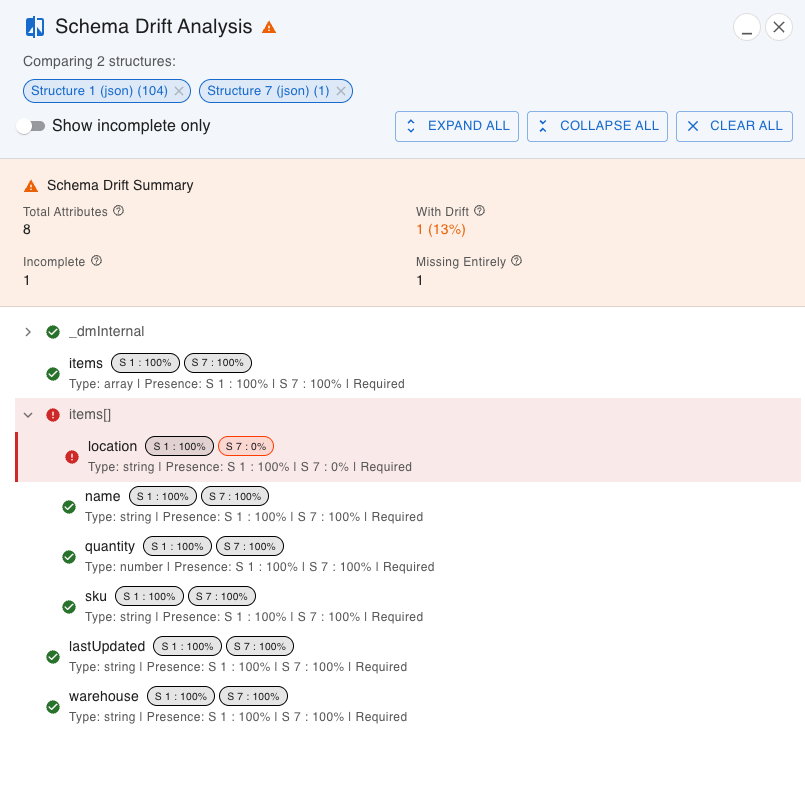
Select two or more structures and the Schema Drift Analysis lists every attribute with its presence in each structure. A field at 100 % is always there, one between 50 and 99 % is optional in practice, and one at 0 % is missing from that structure entirely.
- Summary of attributes with drift, incomplete and missing entirely
- Presence per structure for each attribute, for example
S 1: 100 %andS 7: 0 % - The detected type of each attribute
- Show incomplete only hides everything that is consistent
Then find the files behind a difference
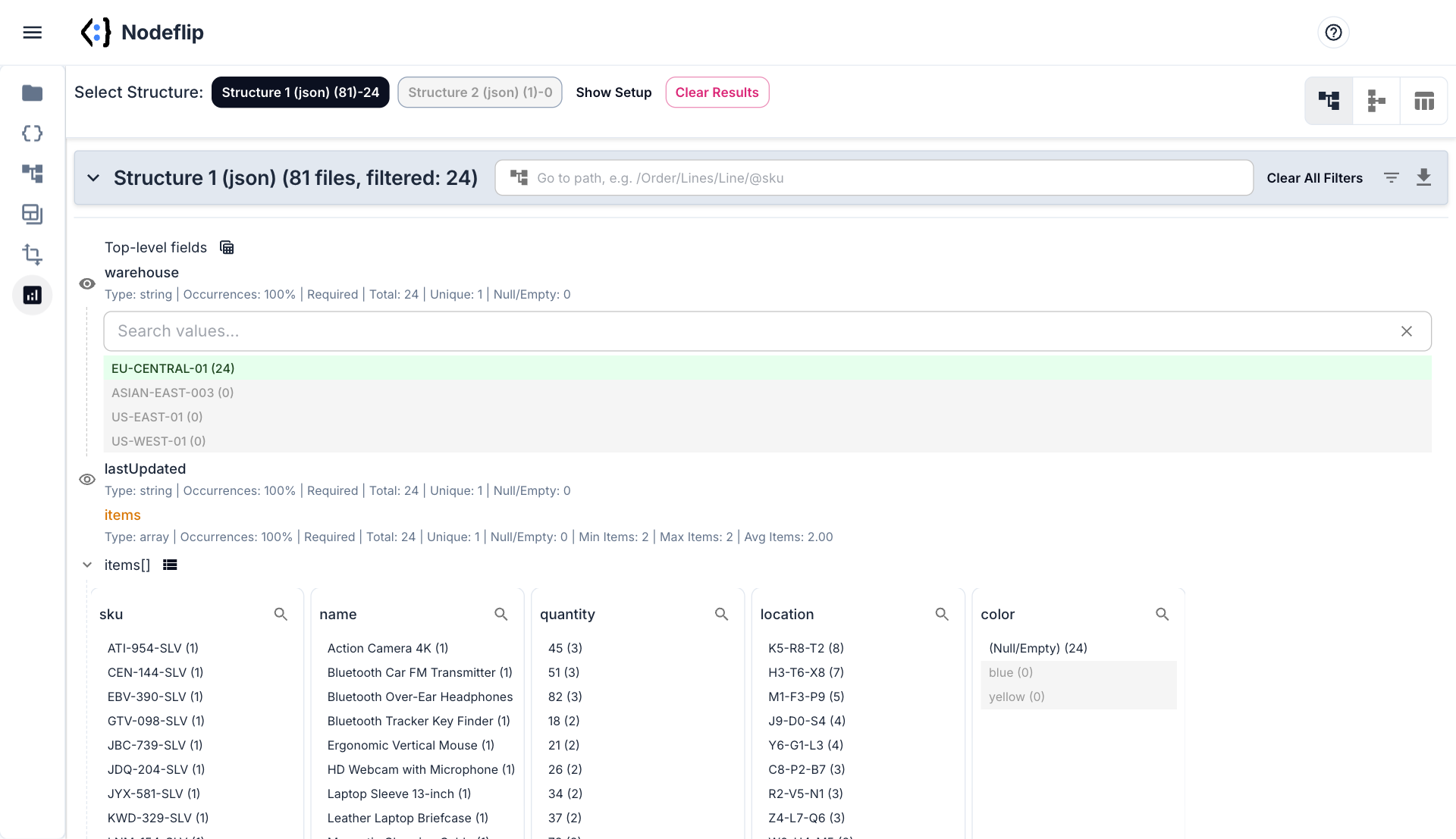
A structure is a group of real files. Open it and click a value to filter, for example one warehouse, and the counts for every other field follow. That is how you get from "the field is missing in 24 files" to "all 24 came from the same warehouse".
- Click values to filter, across all structures at once
- Min, max, average, count and occurrences per field
- Counts of empty and missing values
- Export exactly the files that match
What schema drift looks like, and why a diff does not find it
Schema drift is what happens when the files you receive stop looking like the files you built for, without anyone telling you. There is rarely a schema to check against. The only specification is the files themselves.
The usual kinds of drift
- A field disappears or is renamed.
locationbecomesbatch. To a consumer that is one field removed and one unknown field added. - A required field becomes optional. It is there in most files, so every test passes, and missing in the 3 % that fail in production.
- A value changes shape.
"warehouse": "GOT-01"becomes"warehouse": { "id": "GOT-01" }. - One or many. After a conversion from XML to JSON, a single item is an object and several items are an array. Both are correct, and they are two different structures.
- Missing or empty. A field that is absent,
nulland""are three different things to the code that reads it.
Why a text diff is the wrong tool
A diff compares two files line by line. Two files with the same structure and different values differ on every line. Two JSON files with the same content and a different key order differ everywhere. And with 2,000 files there are about two million pairs to choose from. What you want to compare is not the text but the shape, and not two files but all of them.
How structure comparison works
Nodeflip reduces each file to the set of paths it contains, ignoring the values:
File A: warehouse, lastUpdated, items[].sku, items[].name, items[].quantity, items[].location
File B: warehouse, lastUpdated, items[].sku, items[].name, items[].quantity, items[].batch
Files whose paths are similar enough are put in the same structure. How similar is set with the Structure Similarity Tolerance, so that an optional field does not create a new group unless you want it to. The similarity between two structures is the Jaccard index: the paths they share divided by all paths in either. A and B above share five of seven paths, which is 71 %.
The result reads like a map. A few large structures are your normal message types. A structure with one or two files in it is where to look first, because it is either a new version arriving or a file that is broken.
If you only have two files and want to see every changed value, a side-by-side diff is the right tool, and Nodeflip has one of those too: Compare Files.
How to compare structure across many files in Nodeflip
-
Load the files
Put the XML and JSON files in a ZIP and drag it onto the Files menu in Nodeflip. Folders inside the ZIP are fine, and XML and JSON can be mixed.
-
Run the analysis
Open Data Analysis, select the ZIP, set the Structure Similarity Tolerance and run the analysis. Each detected structure gets a button with its number of files.
-
Look at the diagram
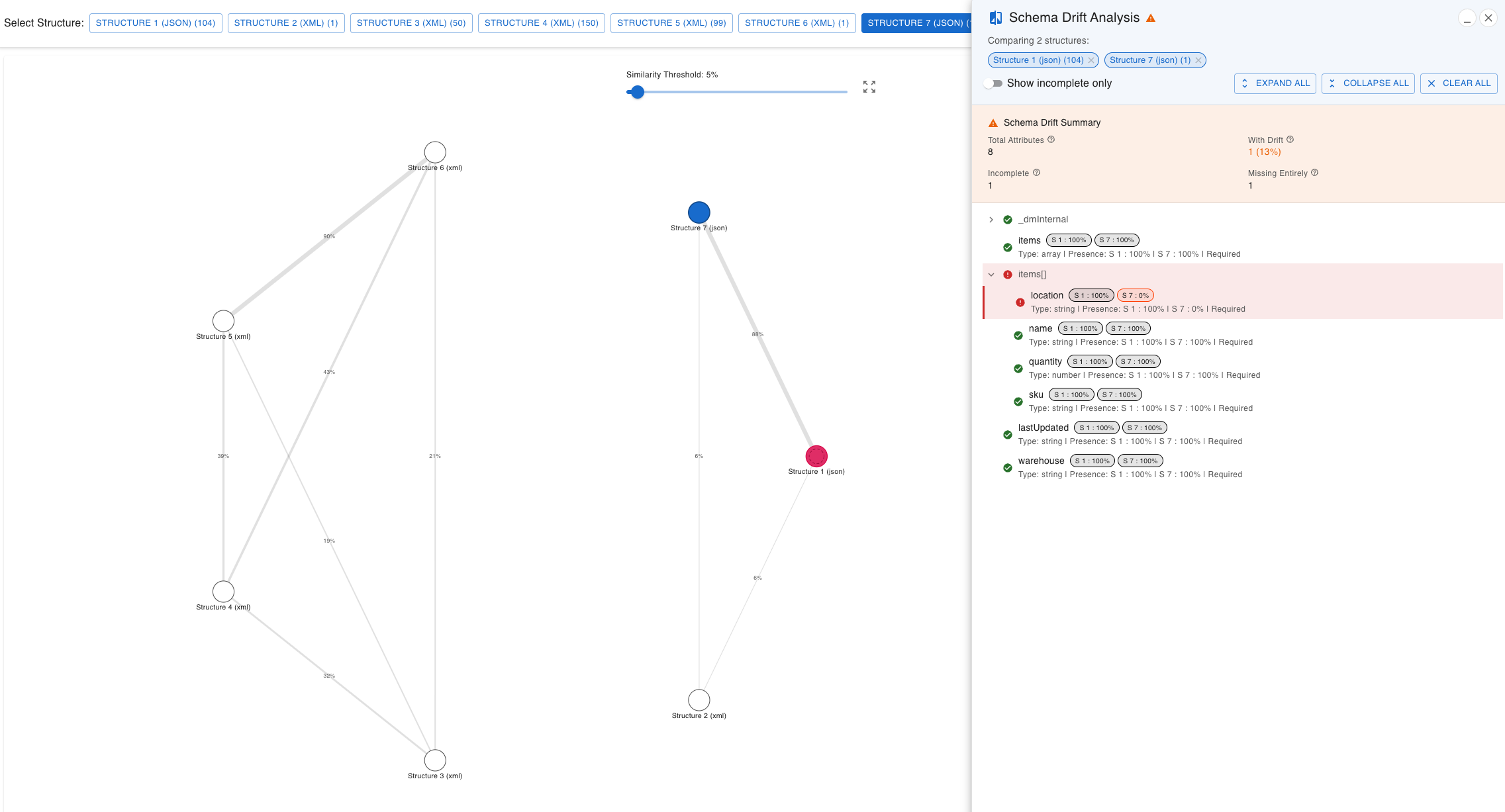
Switch to the similarity diagram. Each structure is a node, and the lines show how similar two structures are in percent.
-
Select the structures to compare
Ctrl-click (Cmd-click on a Mac) two or more nodes. The Schema Drift Analysis panel opens with every attribute and its presence in each structure.
-
Narrow it down
Turn on Show incomplete only to see just the differences. Then open a structure and filter by clicking values to find which files are affected.
Nothing to compare right now? Open a sample set of inventory files in Nodeflip, already analyzed
Questions and answers
How many files can I compare?
The analysis is built for ZIP archives with thousands of files. The practical limit is the memory of your own computer, since everything runs in your browser.
Do I need a schema, such as an XSD or a JSON Schema?
No. The structures are derived from the files themselves, which is the point when no schema exists or when the files have stopped following it.
Can XML and JSON files be mixed?
Yes. Both are analyzed in the same run, and each detected structure is marked as XML or JSON.
Are the files uploaded?
No. The files are read and analyzed in your browser and are not uploaded to a server. The app sends anonymous usage statistics (file type and file size, never file names or content) and error reports.
What if I only want to compare two files?
Use Compare Files for a side-by-side diff of the content. Structure comparison answers a different question: which shapes exist in a set of files, and how they differ.
Is it free?
Yes, Nodeflip is free to use. Without registering you can have two files loaded at a time and work with ZIP archives of up to 25 files. Beyond that you need to register, which is also free.
A folder of files that should look the same?
Load them and see how many structures there really are.
Compare your files in Nodeflip