XRechnung & ZUGFeRD XML Viewer
Open an XRechnung, ZUGFeRD or Factur-X invoice in the CII syntax and read it as a tree and as tables instead of raw XML. Find seller, buyer, tax and totals, see the invoice lines as a grid, and analyze many invoices at once.
- Your files never leave your browser
- Free, no account needed to start
- Nothing to install
Your files never leave your browser
An invoice names both parties, their bank details, the prices and what was delivered. Many online viewers for e-invoices want you to upload the file to show it.
Nodeflip reads, parses and analyzes your files with code that runs in your own browser. The files are not uploaded to a server, so there is no copy of them anywhere else to secure, delete or explain to a customer. That makes it usable when you are not allowed to paste customer data into an AI service or upload it to an online tool.
What the app does send: anonymous usage statistics (file type and file size, never file names or content) and error reports. More about local processing.
One invoice, or all of last month's
Find your way in a CII invoice
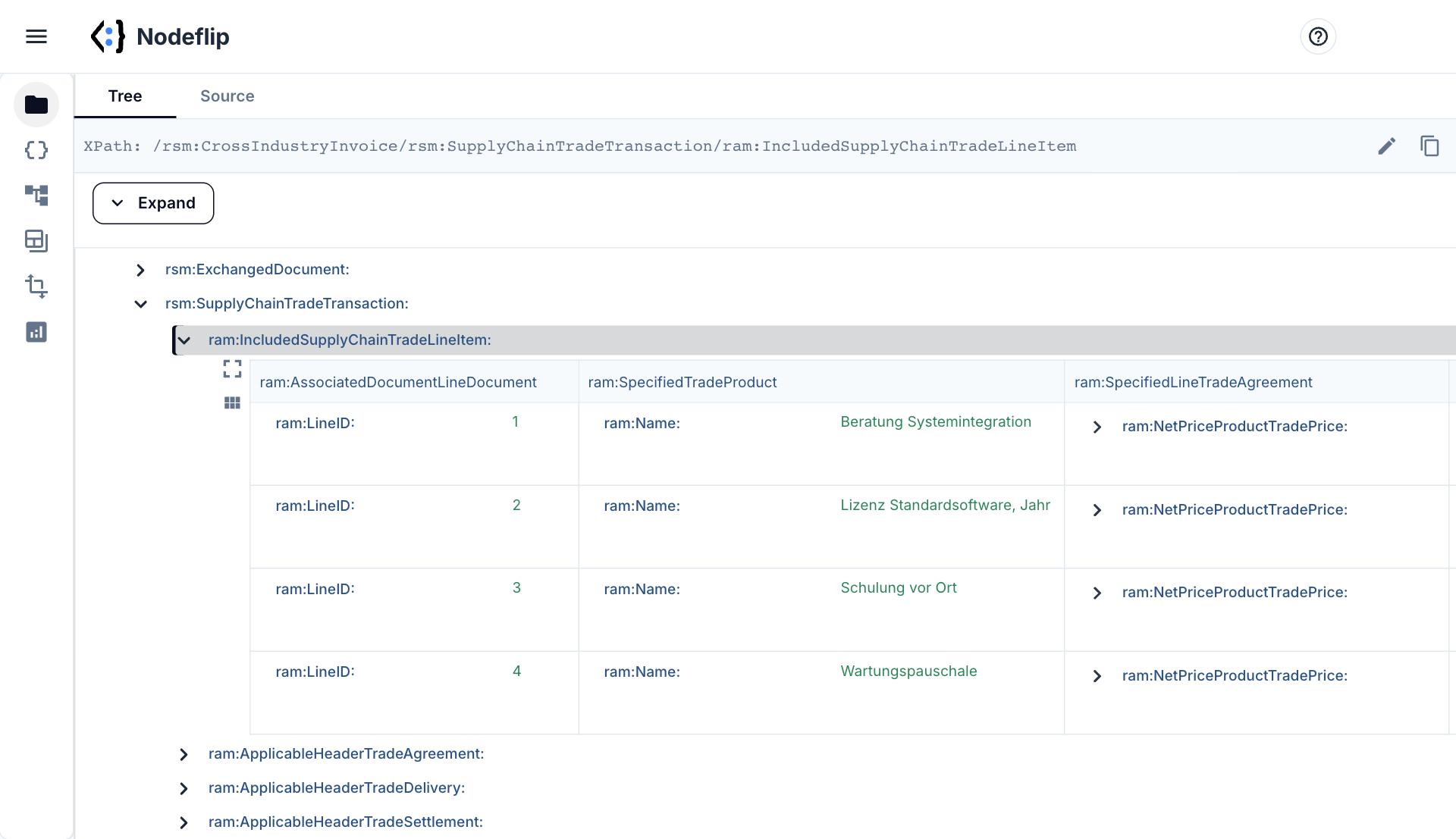
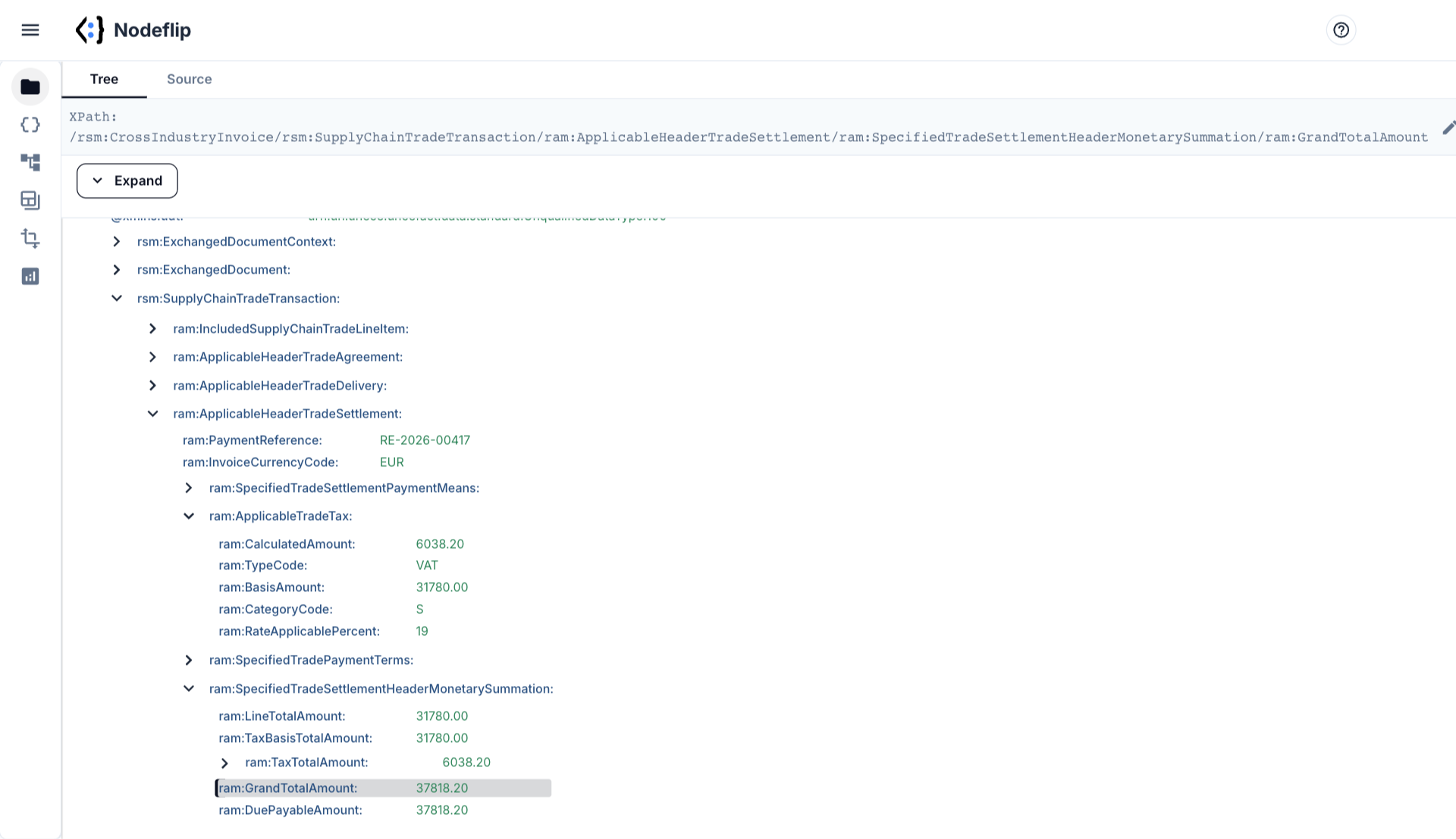
CII element names are long and the nesting is deep. The tree view lets you expand only the part you need, shows the invoice lines as a grid, and gives you the XPath of any element with one click.
- Tree, grid and source view of the same invoice
- Invoice lines side by side as a grid
- Copy the XPath of any element for your mapping
- Compare two invoices side by side
Many invoices: what do they actually contain?
Load a ZIP and Data Analysis reads all the invoices together. CII and UBL invoices end up in separate groups, since their structures have nothing in common. For each field you see how many files contain it and which values occur, and one click on a value filters everything else.
- See which invoices lack a
BuyerReference - List every specification ID, tax category and currency in use
- Tell CII invoices from UBL invoices at a glance
- Export the invoices that match your filter
XRechnung, ZUGFeRD, Factur-X and CII: what is what
All of them are ways of writing an invoice that follows the European standard EN 16931.
- XRechnung is the German set of rules on top of EN 16931. An XRechnung is a pure XML file, and it may be written in either of two syntaxes: UBL or CII.
- ZUGFeRD and Factur-X are the same format under a German and a French name: a PDF with the invoice as CII XML embedded in it. The embedded file is normally called
factur-x.xml. - CII, Cross Industry Invoice, is the UN/CEFACT XML syntax that all of the above can use. This page is about that syntax. For UBL, see the Peppol & UBL invoice viewer.
Nodeflip opens the XML. For a ZUGFeRD or Factur-X PDF, save the embedded XML attachment from your PDF reader first and open that.
What you have is stated near the top of the file:
<rsm:ExchangedDocumentContext>
  <ram:GuidelineSpecifiedDocumentContextParameter>
    <ram:ID>urn:cen.eu:en16931:2017#compliant#urn:xeinkauf.de:kosit:xrechnung_3.0</ram:ID>
  </ram:GuidelineSpecifiedDocumentContextParameter>
</rsm:ExchangedDocumentContext>
An ID that ends in xrechnung_3.0 is an XRechnung. urn:cen.eu:en16931:2017 alone is the EN 16931 profile of ZUGFeRD and Factur-X, and IDs containing factur-x.eu:1p0:basic or factur-x.eu:1p0:extended are the BASIC and EXTENDED profiles.
Where the values live, in CII and in UBL
| You want | CII path | UBL element |
|---|---|---|
| Invoice number | rsm:ExchangedDocument/ram:ID | cbc:ID |
| Issue date | rsm:ExchangedDocument/ram:IssueDateTime/udt:DateTimeString | cbc:IssueDate |
| Buyer reference (Leitweg-ID) | ram:ApplicableHeaderTradeAgreement/ram:BuyerReference | cbc:BuyerReference |
| Seller, buyer | .../ram:SellerTradeParty/ram:Name, .../ram:BuyerTradeParty/ram:Name | cac:AccountingSupplierParty, cac:AccountingCustomerParty |
| Seller VAT number | .../ram:SellerTradeParty/ram:SpecifiedTaxRegistration/ram:ID with @schemeID="VA" | cac:PartyTaxScheme/cbc:CompanyID |
| IBAN | ram:ApplicableHeaderTradeSettlement/.../ram:PayeePartyCreditorFinancialAccount/ram:IBANID | cac:PayeeFinancialAccount/cbc:ID |
| VAT per category | ram:ApplicableHeaderTradeSettlement/ram:ApplicableTradeTax | cac:TaxTotal/cac:TaxSubtotal |
| Totals | .../ram:SpecifiedTradeSettlementHeaderMonetarySummation: ram:TaxBasisTotalAmount, ram:GrandTotalAmount, ram:DuePayableAmount | cac:LegalMonetaryTotal |
| Lines | ram:IncludedSupplyChainTradeLineItem | cac:InvoiceLine |
Things that trip people up
- The lines come first. Inside
rsm:SupplyChainTradeTransactionthe line items are written before the header parts with seller, buyer and totals. In a long invoice, the parties are far down in the file. - Dates are not ISO dates. A date is written as
<udt:DateTimeString format="102">20261012</udt:DateTimeString>. Format 102 means YYYYMMDD without separators. - The Leitweg-ID. XRechnung requires
ram:BuyerReference, and for invoices to German public authorities it holds the routing ID of the receiving office. A missing or wrong one is the classic reason for rejection. - The seller's electronic address. XRechnung requires
ram:URIUniversalCommunicationfor the seller, which plain EN 16931 does not. - Same invoice, two syntaxes. A receiver must handle both UBL and CII, since the sender chooses. The fields are the same and the paths are entirely different, as the table shows.
- The profile decides what may be there. A BASIC invoice lacks elements that an EXTENDED one has. Code written against one profile can miss or misread data in another.
Nodeflip is a viewer and an analysis tool. It does not validate an invoice against the XRechnung or EN 16931 rules, and it does not render the invoice as a printable document.
How to open an XRechnung or ZUGFeRD XML in Nodeflip
-
Get the XML
An XRechnung is already an XML file. For a ZUGFeRD or Factur-X PDF, save the embedded attachment, usually
factur-x.xml, from your PDF reader. -
Load the file
Open Nodeflip and drag the
.xmlfile onto the Files menu, or click LOAD. A ZIP with many invoices is loaded the same way. -
Read it in the tree view
Click the file and expand
rsm:SupplyChainTradeTransaction. The line items are shown as a grid, and the header parts follow below them. -
Copy the path you need
Click a node and its XPath is shown at the top of the window, ready to paste into a mapping.
-
Analyze many invoices
With a ZIP loaded, open Data Analysis and run the analysis. Click a value to filter all invoices at once.
No invoice at hand? Open a synthetic XRechnung in CII syntax in Nodeflip · open 20 sample invoices, already analyzed
Questions and answers
Can I open a ZUGFeRD or Factur-X PDF directly?
No. Nodeflip opens the XML. Save the embedded XML attachment from the PDF first, then open that file.
Does Nodeflip validate the invoice?
No. It shows and analyzes the content. To know whether an invoice follows the XRechnung or EN 16931 rules, use a validator.
What about XRechnung in UBL syntax?
It opens the same way. The structure is the one described on the Peppol & UBL invoice viewer page.
Is the invoice uploaded?
No. The file is read and analyzed in your browser and is not uploaded to a server. The app sends anonymous usage statistics (file type and file size, never file names or content) and error reports.
Can I see the invoice as a readable document?
No. Nodeflip shows the data as a tree, as grids and as source, which is what you need when you build or debug an integration. It does not render an invoice layout.
Is it free?
Yes, Nodeflip is free to use. Without registering you can have two files loaded at a time and work with ZIP archives of up to 25 files. Beyond that you need to register, which is also free.
An e-invoice you need to understand?
Open the XML in your browser and find the field you are looking for.
Open an invoice in Nodeflip