pain.001 Viewer
Open a pain.001 payment file and see every payment as a row in a table, with creditor, amount and reference. Check what the file really says before it goes to the bank, or find out why the bank rejected it.
- Your files never leave your browser
- Free, no account needed to start
- Nothing to install
Your files never leave your browser
A payment file lists who a company is about to pay, to which account and how much. It is exactly the kind of file that should not be pasted into an online tool.
Nodeflip reads, parses and analyzes your files with code that runs in your own browser. The files are not uploaded to a server, so there is no copy of them anywhere else to secure, delete or explain to a customer. That makes it usable when you are not allowed to paste customer data into an AI service or upload it to an online tool.
What the app does send: anonymous usage statistics (file type and file size, never file names or content) and error reports. More about local processing.
See the payments, not the tags
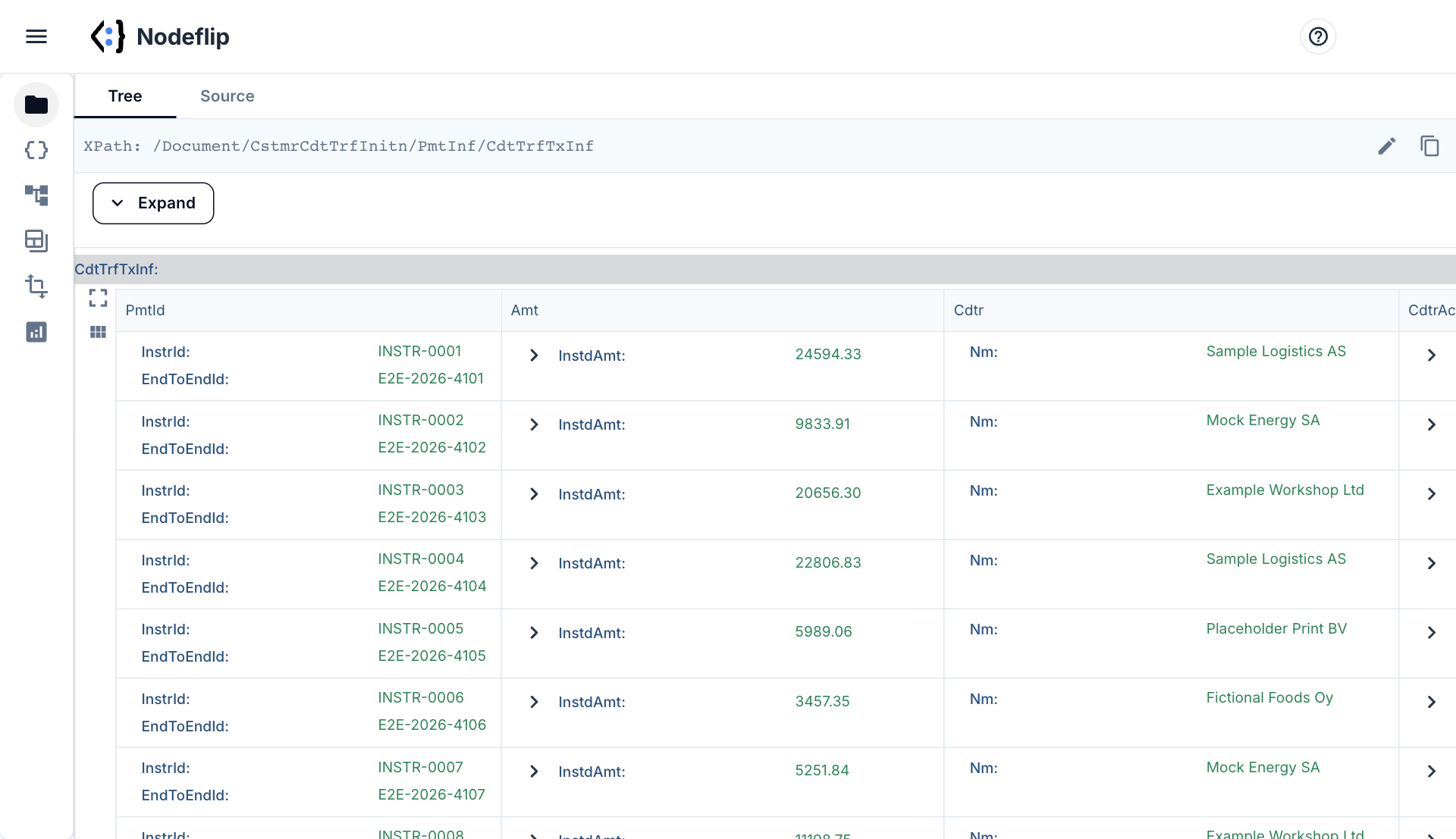
Every payment as a row
The CdtTrfTxInf elements are shown as a grid, with payment IDs, amount and creditor side by side. Go through them row by row, expand one for its account and remittance details, or look for the payment whose IBAN the bank complained about.
- Payment IDs, amount and creditor side by side
- Expand any row to its account and remittance details
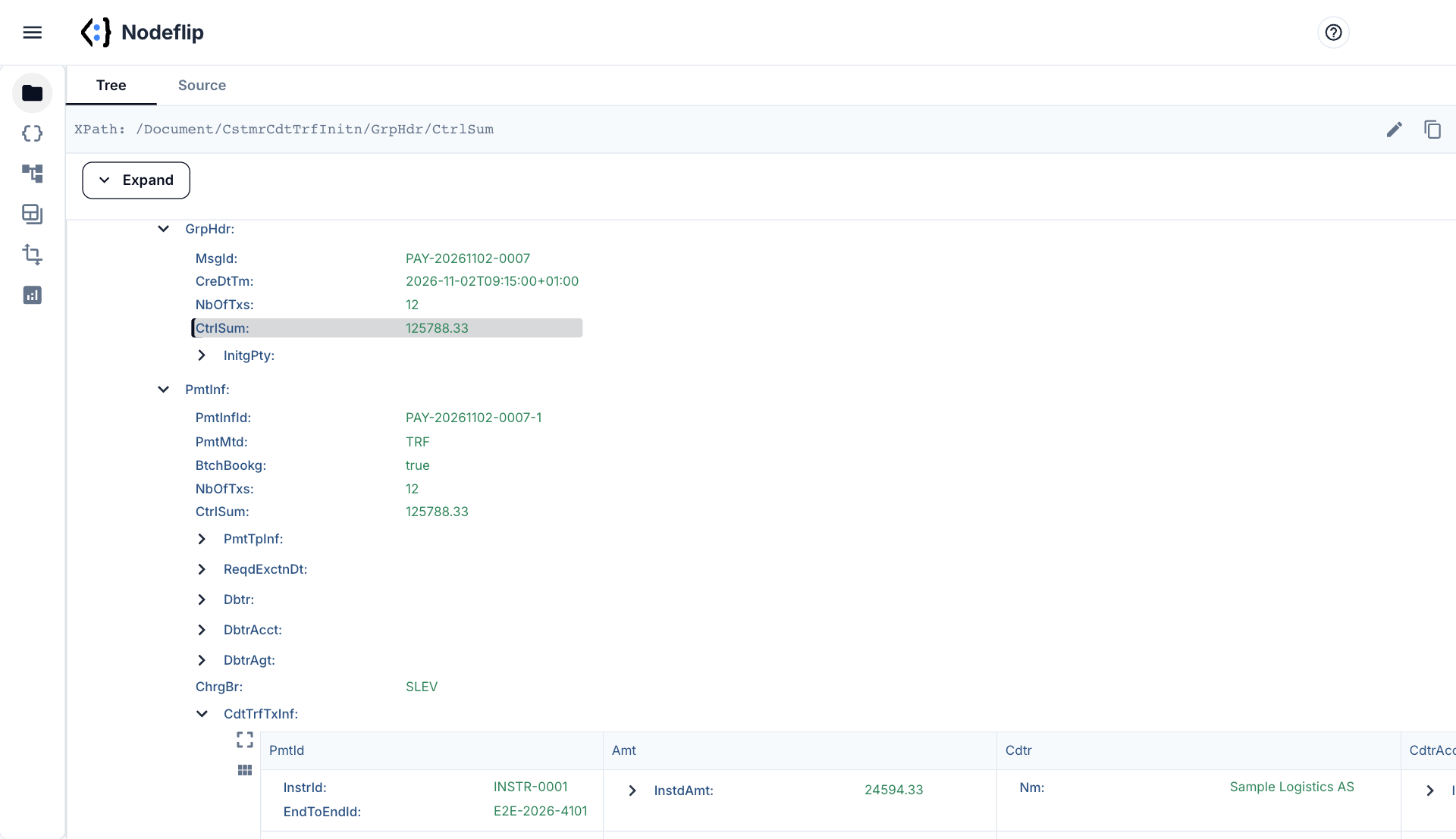
- Group header and payment information as a tree above
- Copy the XPath of the element named in an error message
Compare the file that works with the one that does not
When the bank accepts the file from one system and rejects the file from another, load both. Compare Files shows them side by side, and Data Analysis shows which elements one of them has and the other lacks.
- Side-by-side diff of two payment files
- Structure comparison across many files
- See every currency, service level and charge bearer in use
How a pain.001 file is built
pain.001 is the ISO 20022 message a company sends to its bank to order payments. Its full name is Customer Credit Transfer Initiation. The version is in the namespace of the root element, most often pain.001.001.03 or pain.001.001.09.
The file has three levels, and understanding them explains most rejections:
<Document xmlns="urn:iso:std:iso:20022:tech:xsd:pain.001.001.09">
  <CstmrCdtTrfInitn>
    <GrpHdr>          <!-- one per file: who sends it, how many payments, total -->
    <PmtInf>          <!-- one per batch: debtor account, execution date -->
      <CdtTrfTxInf>   <!-- one per payment: creditor, account, amount, reference -->
      <CdtTrfTxInf>
    </PmtInf>
  </CstmrCdtTrfInitn>
</Document>
Where the values live
| You want | Path |
|---|---|
| File ID, number of payments, total | GrpHdr/MsgId, GrpHdr/NbOfTxs, GrpHdr/CtrlSum |
| Paying account | PmtInf/DbtrAcct/Id/IBAN, PmtInf/DbtrAgt/FinInstnId |
| Execution date | PmtInf/ReqdExctnDt (version 03), PmtInf/ReqdExctnDt/Dt (version 09) |
| Payment type | PmtInf/PmtTpInf/SvcLvl/Cd, for example SEPA |
| Amount | CdtTrfTxInf/Amt/InstdAmt with @Ccy |
| Creditor and account | CdtTrfTxInf/Cdtr/Nm, CdtTrfTxInf/CdtrAcct/Id/IBAN |
| Your reference for the payment | CdtTrfTxInf/PmtId/EndToEndId |
| What the creditor sees | CdtTrfTxInf/RmtInf/Ustrd or RmtInf/Strd/CdtrRefInf/Ref |
Why banks reject payment files
- The counts and sums do not add up.
NbOfTxsandCtrlSumexist both inGrpHdrand in eachPmtInf, and must match the payments below them. A file that was edited by hand, or built by a system that rounds differently, fails here. - The wrong version, or the right version with the wrong details. Version 09 uses
BICFIwhere version 03 usesBIC, and wraps the execution date inDt. A file that mixes them is not valid in either. - Each bank has its own rules. The schema allows much more than any bank accepts. Which elements are required, which are ignored and which are refused is in the bank's implementation guide, and it differs between banks.
- Length and characters.
EndToEndIdmay be 35 characters andUstrd140. Many banks accept only a limited Latin character set, so a name with an unusual character can stop a whole batch. - IDs that are not unique. A
MsgIdthat the bank has seen before is often refused as a duplicate.
The EndToEndId you set here comes back on the bank statement, which is how a payment is matched afterwards. See the camt.053 viewer. The bank's answer to the file itself is a pain.002 status report, which Nodeflip opens in the same way.
Nodeflip is a viewer and an analysis tool. It does not validate a file against the schema or against a bank's rules, and it does not send anything to a bank.
How to check a pain.001 file in Nodeflip
-
Load the file
Open Nodeflip and drag the
.xmlpayment file onto the Files menu, or click LOAD. -
Read the group header
Click the file and expand
CstmrCdtTrfInitnandGrpHdrto see the message ID, the number of payments and the control sum. -
Check each batch
Expand a
PmtInffor the paying account, the execution date and the batch totals. -
Go through the payments
The
CdtTrfTxInfelements are shown as a grid. Go through them row by row, and expand a row for its details. -
Find the element in the error message
Click a node and its XPath is shown at the top of the window. You can also type or paste a path there to jump straight to the element the bank pointed at.
No payment file at hand? Open a synthetic pain.001 file in Nodeflip
Questions and answers
Which pain.001 versions can I open?
All of them, including pain.001.001.03 and pain.001.001.09. Nodeflip reads any well-formed XML and does not depend on the schema version.
Does Nodeflip validate the file against my bank's rules?
No. It shows and analyzes the content, so that you can see what the file says. Whether a bank accepts it is decided by the schema and by that bank's implementation guide.
Is the payment file uploaded?
No. The file is read and analyzed in your browser and is not uploaded to a server. The app sends anonymous usage statistics (file type and file size, never file names or content) and error reports.
Can I open pain.002 and pain.008 too?
Yes. Status reports (pain.002), direct debits (pain.008) and other ISO 20022 messages open the same way.
Can I edit the file?
The source view has an editor, so a file can be corrected and downloaded again. Remember that the counts and control sums must still match after a change.
Is it free?
Yes, Nodeflip is free to use. Without registering you can have two files loaded at a time and work with ZIP archives of up to 25 files. Beyond that you need to register, which is also free.
A payment file you want to check first?
Open it in your browser and read the payments as a table.
Open a payment file in Nodeflip