SAF-T File Viewer
Open a SAF-T audit file and read it as a tree and as tables instead of raw XML. Browse the chart of accounts, customers and suppliers, open any transaction to see its lines, and copy the XPath of anything you find.
- Your files never leave your browser
- Free, no account needed to start
- Nothing to install
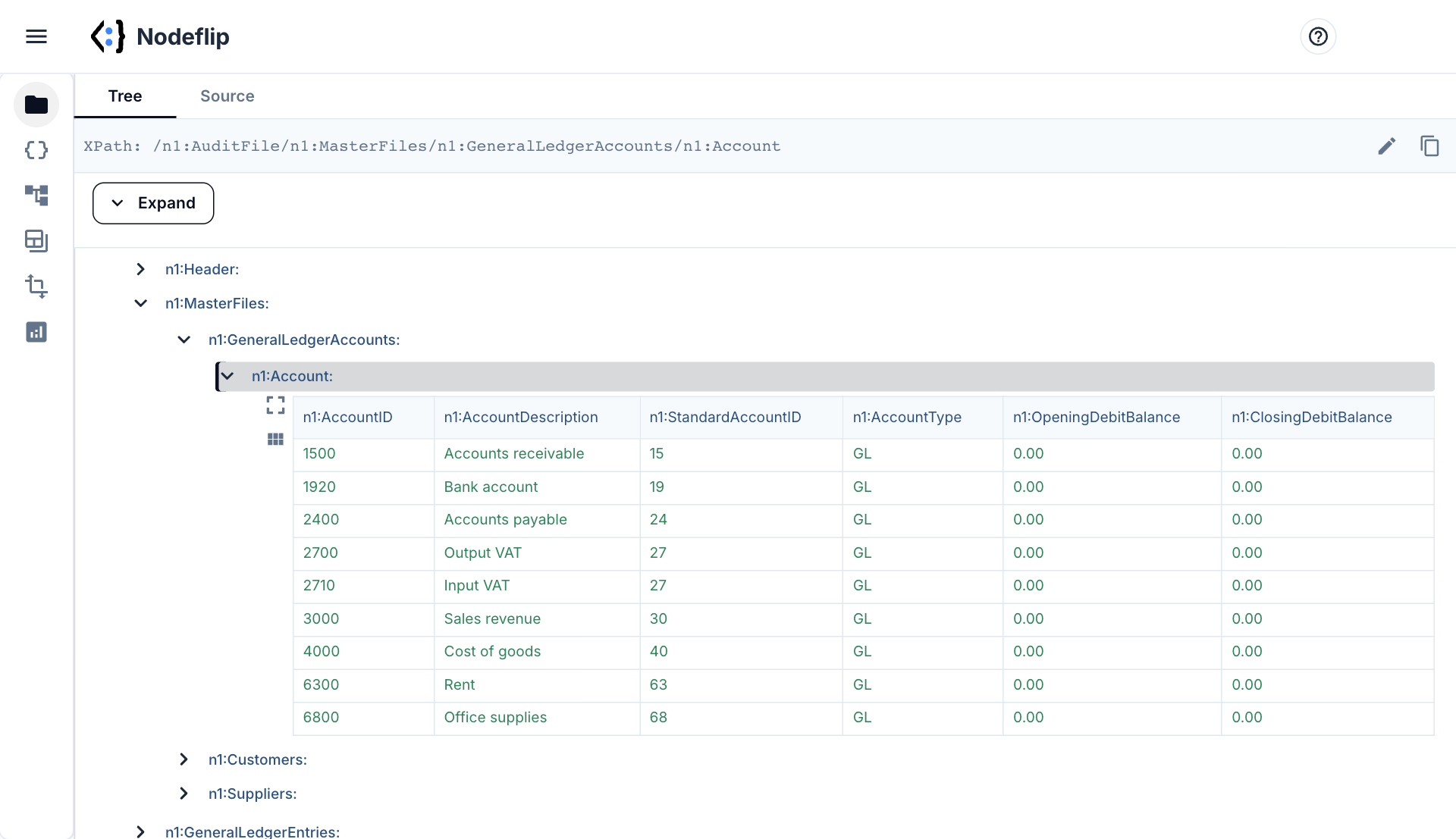
Your files never leave your browser
A SAF-T file is a company's complete bookkeeping for a period: every transaction, every customer and supplier, every amount. It is about the last file that should be uploaded to an online viewer.
Nodeflip reads, parses and analyzes your files with code that runs in your own browser. The files are not uploaded to a server, so there is no copy of them anywhere else to secure, delete or explain to a customer. That makes it usable when you are not allowed to paste customer data into an AI service or upload it to an online tool.
What the app does send: anonymous usage statistics (file type and file size, never file names or content) and error reports. More about local processing.
A whole ledger, readable
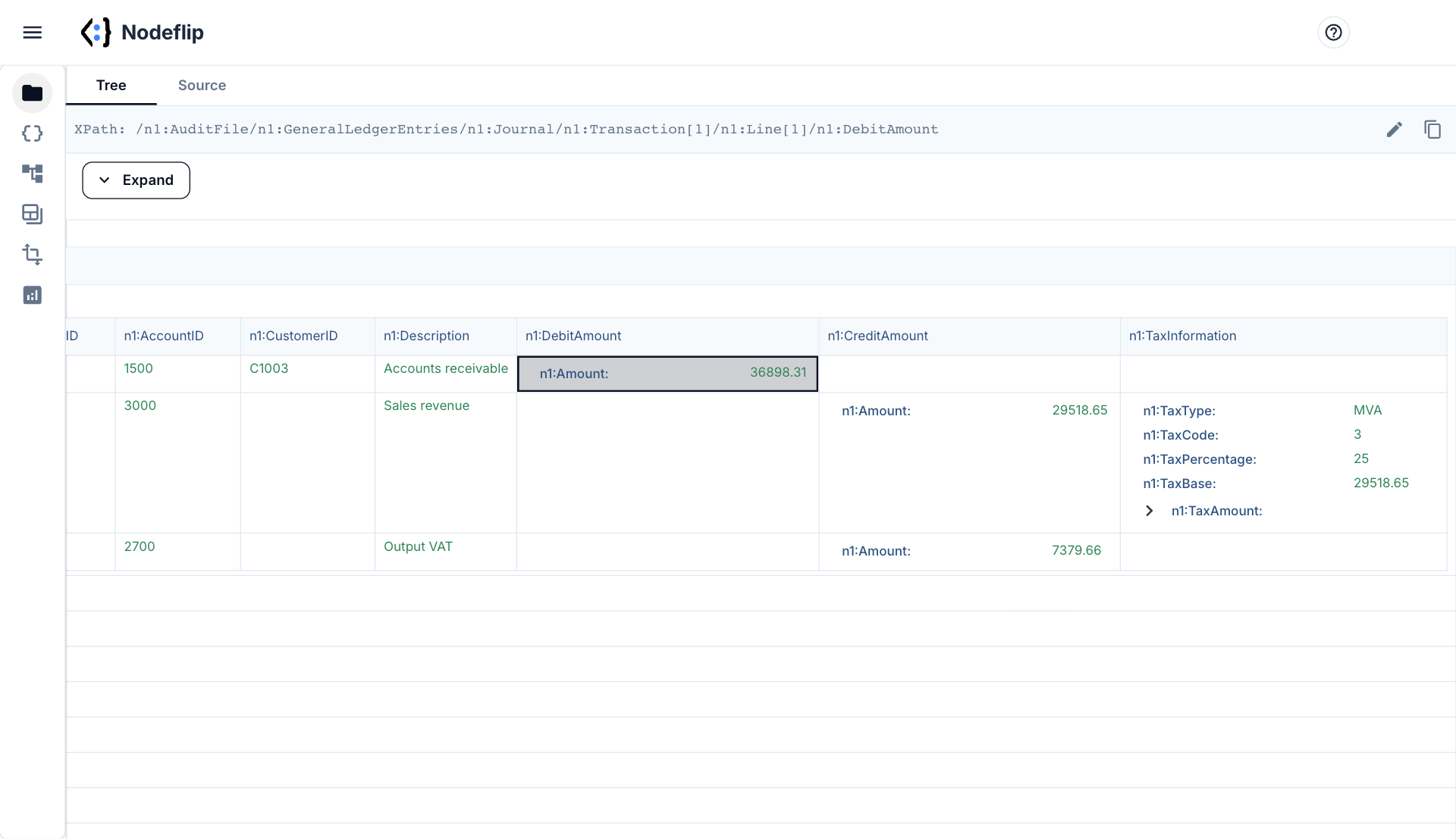
Open a transaction and see its lines
Repeating elements are shown as grids. Expand a transaction and its lines are laid out side by side: account, customer or supplier, description, debit or credit, and tax information. The chart of accounts, customers and suppliers are grids that you can sort and filter. Long lists are shown 100 rows at a time, so the page stays responsive.
- Chart of accounts, customers and suppliers as grids
- Debit, credit and tax information of each line in columns
- Copy the XPath of any element
- Switch to source view to see the raw XML at the same place
Compare exports from different systems
Two accounting systems rarely write the same SAF-T. Load the files together and Data Analysis shows which elements each of them contains, how often, and which values occur. That is a quick way to see why a file from one system imports cleanly and a file from another does not.
- See which optional elements a system leaves out
- List every tax code, journal type and account type in use
- Min, max and sum of amounts, updated as you filter
How a SAF-T file is organized
SAF-T, the Standard Audit File for Tax, is an OECD design for handing bookkeeping data to a tax authority in one XML file. Each country has made its own version of it. Norway, Portugal, Poland, Lithuania, Luxembourg, Romania and Denmark all use SAF-T, with different schemas, different namespaces and in some cases different names for the same thing. Check AuditFileCountry and AuditFileVersion in the header before assuming that what you know from one country applies.
The structure below is the financial variant used in Norway, which stays close to the OECD original. Element names often carry a prefix such as n1:.
| Section | What is in it |
|---|---|
Header | Version, country, the system that produced the file, the company, default currency and the period in SelectionCriteria |
MasterFiles/GeneralLedgerAccounts | One Account per ledger account: AccountID, description, the standard account it maps to, opening and closing balance |
MasterFiles/Customers, Suppliers | Name, registration number and the ID that the transaction lines refer to |
MasterFiles/TaxTable | The tax codes of the system and the standard tax codes they map to |
GeneralLedgerEntries | NumberOfEntries, TotalDebit, TotalCredit, then Journal → Transaction → Line |
A posting looks like this. Each Transaction has at least two lines, and their debits and credits balance.
<n1:Line>
  <n1:RecordID>2</n1:RecordID>
  <n1:AccountID>3000</n1:AccountID>
  <n1:Description>Sales revenue</n1:Description>
  <n1:CreditAmount>
    <n1:Amount>12400.00</n1:Amount>
  </n1:CreditAmount>
  <n1:TaxInformation>
    <n1:TaxCode>3</n1:TaxCode>
    <n1:TaxPercentage>25</n1:TaxPercentage>
    <n1:TaxAmount><n1:Amount>3100.00</n1:Amount></n1:TaxAmount>
  </n1:TaxInformation>
</n1:Line>
Things that trip people up
- Amounts have no sign. A line has either a
DebitAmountor aCreditAmount, each with anAmountinside. Summing "the amount" without looking at which of the two it is gives nonsense. - The control totals.
TotalDebitandTotalCreditat the top ofGeneralLedgerEntriesshould equal the sums of the lines, andNumberOfEntriesthe number of transactions. A mismatch is a common reason for a rejected file. - Everything is a reference. A line carries an
AccountID, aCustomerIDor aSupplierIDand aTaxCode. The names and the standard codes are inMasterFiles, and a line that refers to an ID that is not there is an error. - Standard accounts and standard tax codes. The file must map the company's own accounts and tax codes to the authority's standard ones. Missing or wrong mappings pass an XML schema check and fail later.
- Size. A year of transactions for a mid-sized company can be several hundred megabytes, which is why exports are often split by period.
Nodeflip is a viewer and an analysis tool. It does not validate a file against a country's schema or business rules. Files of tens of megabytes work well. A file of several hundred megabytes may need more memory than a browser tab has, so export a shorter period if you can.
How to open a SAF-T file in Nodeflip
-
Load the file
Open Nodeflip and drag the SAF-T
.xmlfile onto the Files menu, or click LOAD. If the export is a ZIP, load the ZIP. -
Start with the header
Click the file and expand
Headerto see country, version, the producing system and the period the file covers. -
Browse the master data
Expand
MasterFiles. Accounts, customers and suppliers are shown as grids that you can sort and filter. -
Follow the transactions
Expand
GeneralLedgerEntriesand aJournal. The transactions are shown as a grid. Expand one to see its lines. -
Copy the path
Click a node and its XPath is shown at the top of the window, ready to paste into a mapping or a message to the system vendor.
No file at hand? Open a small synthetic SAF-T file in Nodeflip
Questions and answers
Which SAF-T versions and countries work?
All of them, as long as the file is well-formed XML. Nodeflip does not depend on a schema, so Norwegian, Portuguese, Polish and other variants open the same way.
Does Nodeflip validate the file?
No. It shows and analyzes the content. To know whether a tax authority will accept the file, use that authority's validator.
How large a file can I open?
Files of tens of megabytes work well. Everything runs in your browser, so the limit is the memory of your computer, and a file of several hundred megabytes may be too much for one tab.
Is the file uploaded?
No. The file is read and analyzed in your browser and is not uploaded to a server. The app sends anonymous usage statistics (file type and file size, never file names or content) and error reports.
Can I get the transactions out as a table?
You can read them as grids in the tree view. To follow one account through every transaction, or to pull chosen values out of one or many files, use the Data Extractor with an XPath expression.
Is it free?
Yes, Nodeflip is free to use. Without registering you can have two files loaded at a time and work with ZIP archives of up to 25 files. Beyond that you need to register, which is also free.
Got a SAF-T file to check?
Open it in your browser and look at the ledger as tables.
Open a SAF-T file in Nodeflip