XSLT Tester Online
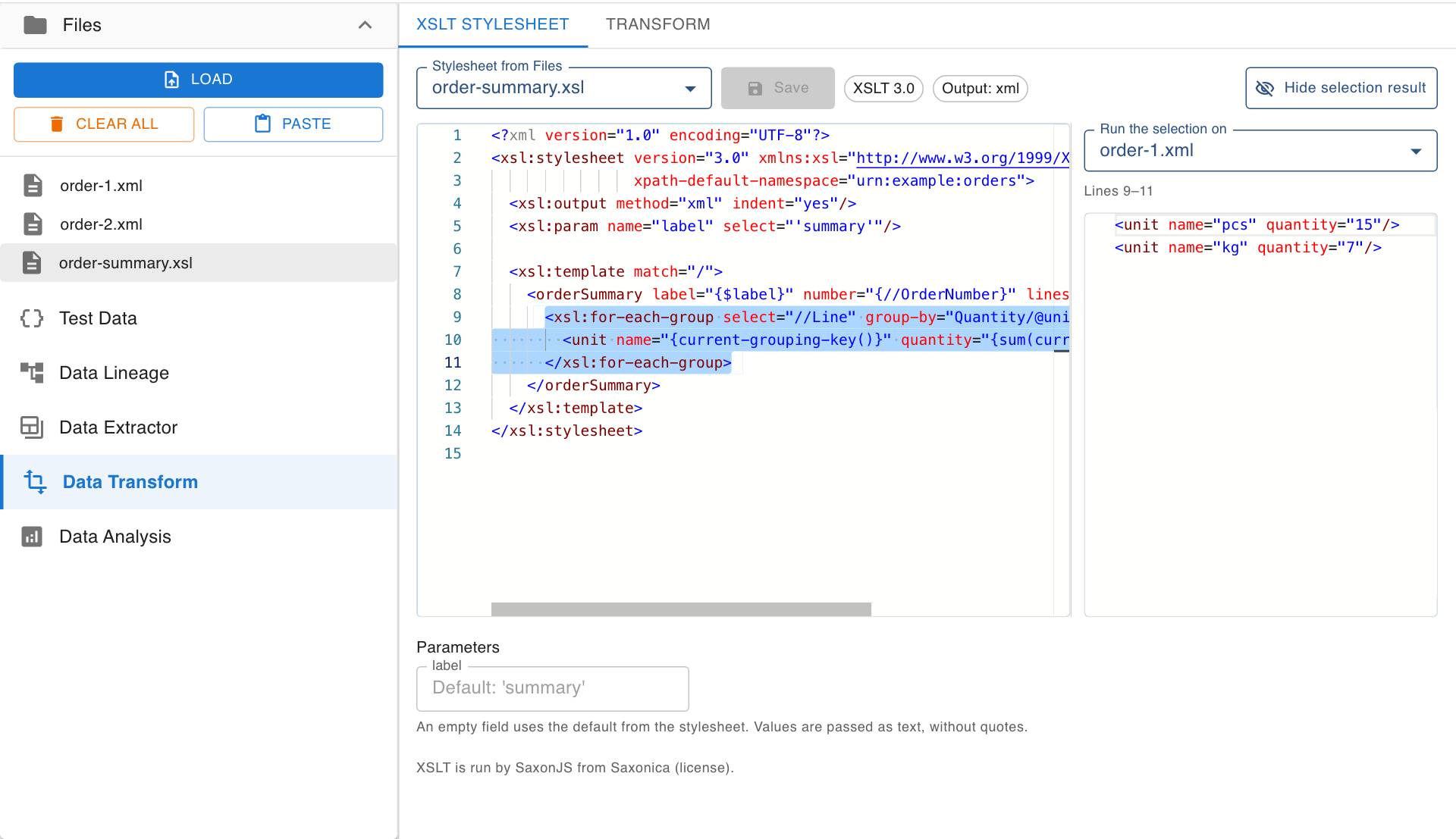
Run an XSLT 1.0, 2.0 or 3.0 stylesheet against an XML file and watch the result update while you edit. Select lines in the stylesheet to see exactly what those lines produce.
- Your files never leave your browser
- Free, no account needed to start
- Nothing to install
Your files never leave your browser
The XML you test a stylesheet against is usually a real message: an order, an invoice, a patient record. Many online XSLT testers send both the XML and the stylesheet to a server to run the transformation.
Nodeflip reads, parses and analyzes your files with code that runs in your own browser. The files are not uploaded to a server, so there is no copy of them anywhere else to secure, delete or explain to a customer. That makes it usable when you are not allowed to paste customer data into an AI service or upload it to an online tool.
What the app does send: anonymous usage statistics (file type and file size, never file names or content) and error reports. More about local processing.
Find out what your stylesheet really does
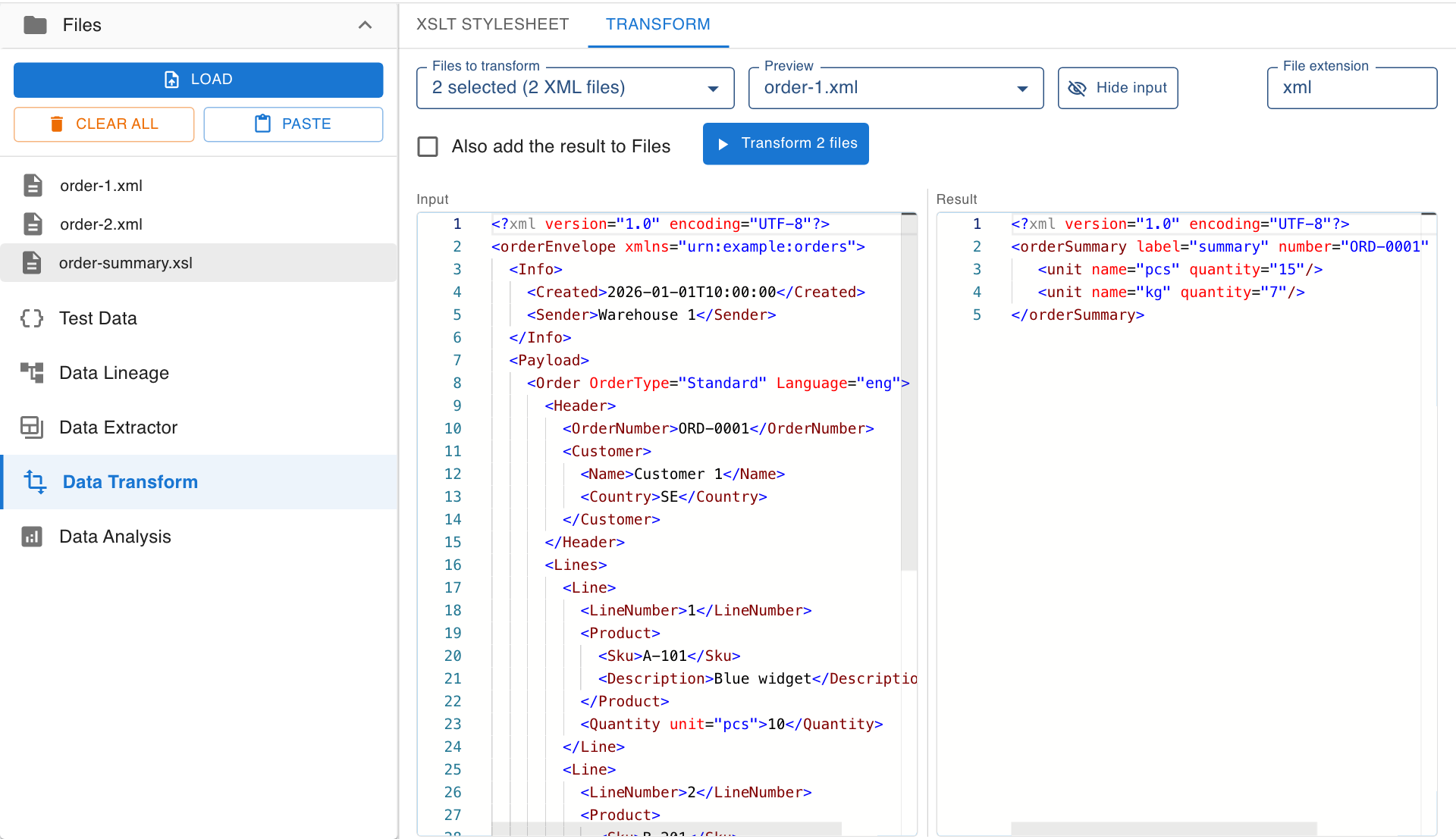
Input and result side by side
The Transform tab shows one of your files next to what the stylesheet makes of it. The result follows every change to the stylesheet and its parameters, so you never run a transformation to find out that a bracket was missing.
- Live result with syntax highlighting
- Errors are shown where they occur
- XML, text, HTML or JSON output
- Switch the previewed file to check several inputs
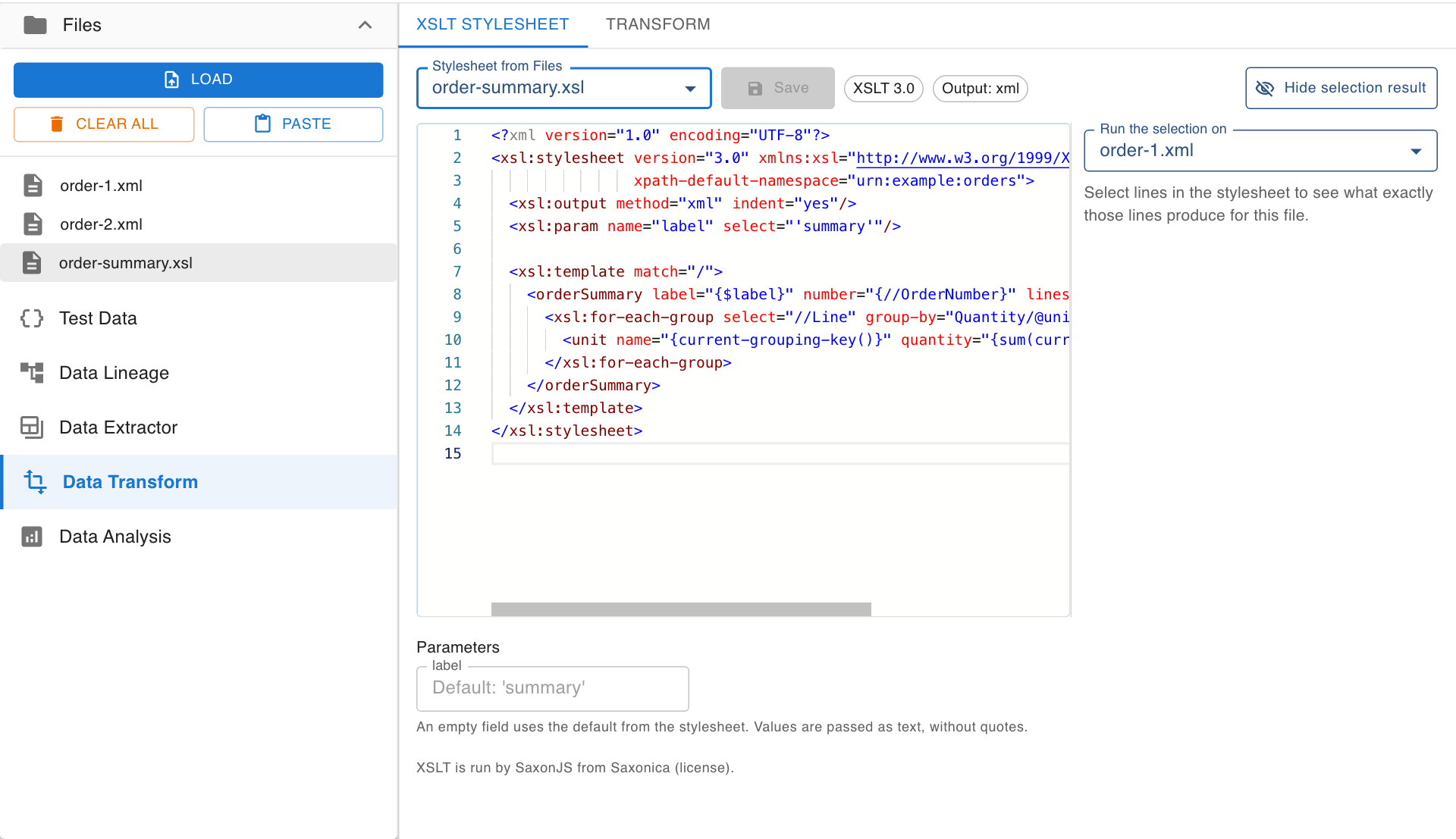
Parameters without editing the stylesheet
Nodeflip reads the XSLT version, the output method and every top-level xsl:param from the stylesheet and gives each parameter a field. Fill in a value and the result updates.
- XSLT 1.0, 2.0 and 3.0, run by SaxonJS
- Defaults from the stylesheet shown as hints
xsl:messageoutput is collected and shown- Run the finished stylesheet over many files or a ZIP
Why an XSLT result is rarely what you expected
XSLT is declarative. You do not write the order things happen in, the processor decides which template handles which node. When the output is wrong, the question is therefore seldom "what is on this line" but "did this line run at all, and for which nodes". These are the usual causes.
The namespace that makes nothing match
By far the most common one. If the XML declares a default namespace, its elements are in that namespace, and a path without a prefix does not find them.
<Order xmlns="urn:example:orders">
  <OrderNumber>SO-10482</OrderNumber>
</Order>

<!-- Matches nothing: looks for Order in no namespace -->
<xsl:template match="Order">

<!-- XSLT 1.0: declare a prefix and use it -->
<xsl:template match="o:Order" xmlns:o="urn:example:orders">

<!-- XSLT 2.0 and later: set it once on xsl:stylesheet -->
<xsl:stylesheet version="3.0" xpath-default-namespace="urn:example:orders" ...>
Text that appears from nowhere
Nodes that no template matches are handled by the built-in rules, which walk down the tree and copy every text node to the output. Stray values between your elements mean that something was not matched. An empty template for the parts you do not want, or a more specific xsl:apply-templates select, removes them.
The context changed
Inside xsl:for-each and inside a template, paths are relative to the current node. Quantity works inside a loop over Line and returns nothing one level up. A variable declared before the loop is the usual way to bring an outer value in.
The wrong version of XSLT
Browsers have only ever had XSLT 1.0 built in, and many online testers are limited to it as well. xsl:for-each-group, regular expressions, date functions, sequences and user-defined functions need 2.0 or later. A stylesheet written for Saxon on a server fails in a 1.0 processor with an error that seldom says "wrong version".
How to find the cause faster
The classic method is to add xsl:message in a few places and run again. In Nodeflip you select the lines you wonder about instead. A panel shows what exactly those lines write for the file you chose: elements, attributes and text, once for every time the lines run. No output means the lines never ran, which points at the match or the context. Select a variable to see its value.
How to test an XSLT stylesheet in Nodeflip
-
Load the XML and the stylesheet
Open Nodeflip and drag your
.xmlfile and your.xslor.xsltfile onto the Files menu. You can also write the stylesheet from scratch in the editor. -
Choose the stylesheet
Open Data Transform. On the XSLT Stylesheet tab, pick the stylesheet from Files. Its version, output method and parameters are detected.
-
Check the result
Switch to the Transform tab and choose the XML file. The input and the result are shown side by side and update as you edit.
-
Select lines to see what they produce
Back in the editor, select one or more lines. The selection result panel shows what they write for the file you chose in Run the selection on.
-
Save the result
Click Transform to save the result as a file. With several files or a ZIP selected, you get a ZIP with one result per input file.
Want something to try with? Open a sample order and a stylesheet that uses xsl:for-each-group in Nodeflip
Questions and answers
Which XSLT versions can I test?
XSLT 1.0, 2.0 and 3.0. The stylesheets are run by SaxonJS in your browser, so instructions such as xsl:for-each-group and XPath 3.1 functions work.
Are my XML and my stylesheet sent to a server?
No. The transformation runs in your browser and the files are not uploaded. The app sends anonymous usage statistics (file type and file size, never file names or content) and error reports.
Can a stylesheet load other documents?
No. For privacy, a stylesheet in Nodeflip cannot read other files or URLs. A stylesheet that depends on other files needs to be made self-contained first.
Can the output be JSON, text or HTML?
Yes. The output method of the stylesheet decides, and a matching file extension is suggested when you save.
Can I run the stylesheet on many files?
Yes. Select several XML files or a ZIP archive, and the stylesheet is applied to each of them. The result is a ZIP with the same file names and folders.
Is it free?
Yes, Nodeflip is free to use. Without registering you can have two files loaded at a time and work with ZIP archives of up to 25 files. Beyond that you need to register, which is also free.
A stylesheet that does not do what you meant?
Load it with an XML file and select the lines you are unsure about.
Test a stylesheet in Nodeflip