Data Transform
Data Transform applies an XSLT stylesheet to one XML file, several files or every XML file in a ZIP archive, and gives the result as a new file or a new ZIP. The transformation runs in your browser; nothing is uploaded.
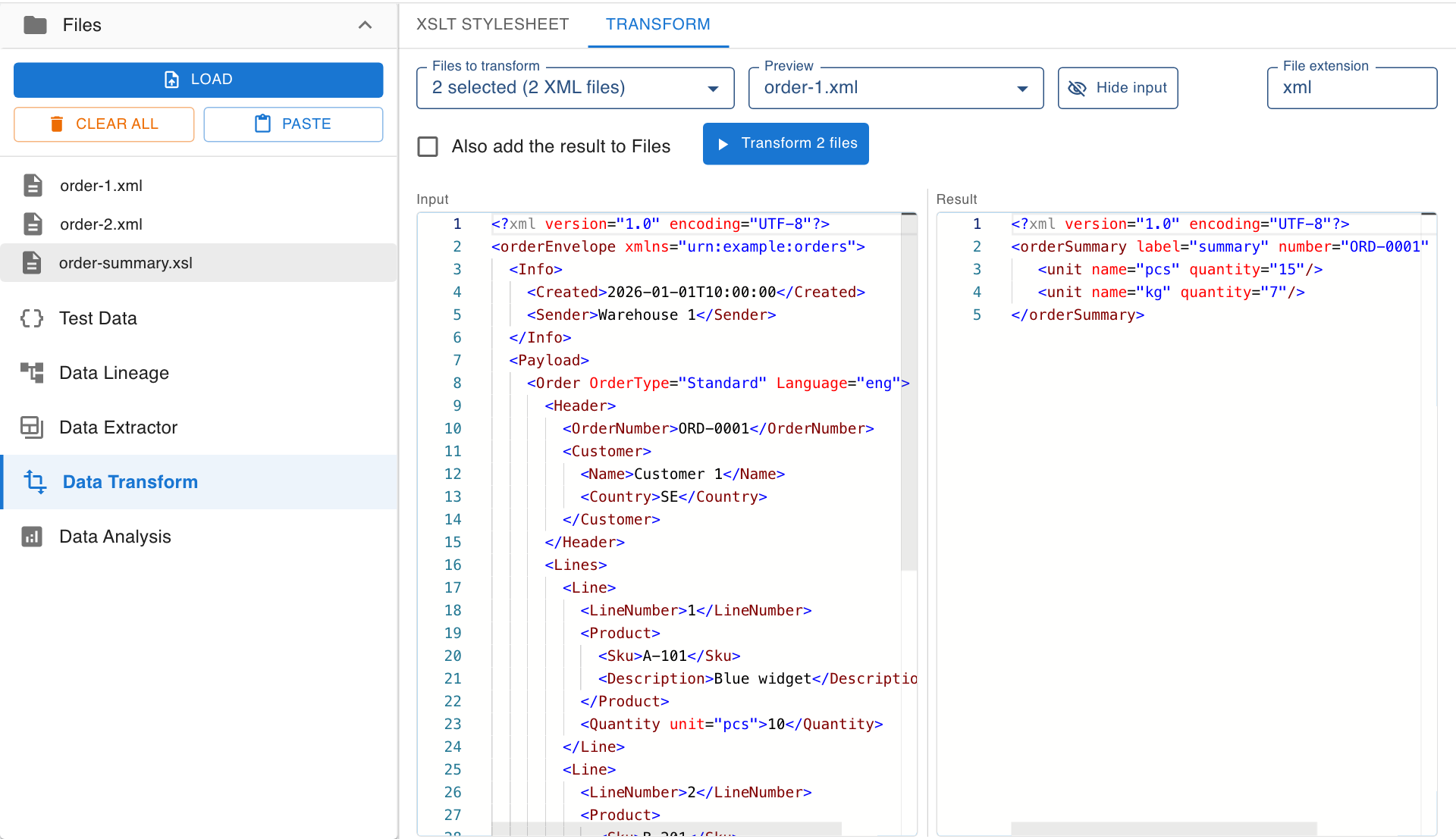
Workflow Overview
- Load files: Load the XML files or ZIP archives to transform in Files. Stylesheets (
.xsl,.xslt) can be loaded the same way. - Choose a stylesheet: On the XSLT Stylesheet tab, choose a stylesheet from Files or write one in the editor.
- Select files: On the Transform tab, choose the files to transform in Files to transform.
- Check the preview: The Transform tab shows one file and its result side by side.
- Transform: Click Transform to run the stylesheet over all selected files and save the result.
The XSLT Stylesheet Tab
Choosing a Stylesheet
- Stylesheet from Files: Lists the XSLT files loaded in Files. Stylesheets are left out of the files to transform, also inside a ZIP.
- Editor: The editor works on a copy of the stylesheet and says when it differs from the file.
- Save: Writes the stylesheet back to its file in Files. A stylesheet that is not from Files is added as a new file.
- Version and output: The XSLT version (1.0, 2.0 or 3.0) and the output method are read from the stylesheet and shown above the editor.
Parameters
- Every
xsl:paramdeclared at the top level of the stylesheet gets a field under the editor. - An empty field uses the default from the stylesheet. Values are passed as text, without quotes.
Selection Result
Select lines in the stylesheet to see what exactly those lines produce for the file chosen in Run the selection on.
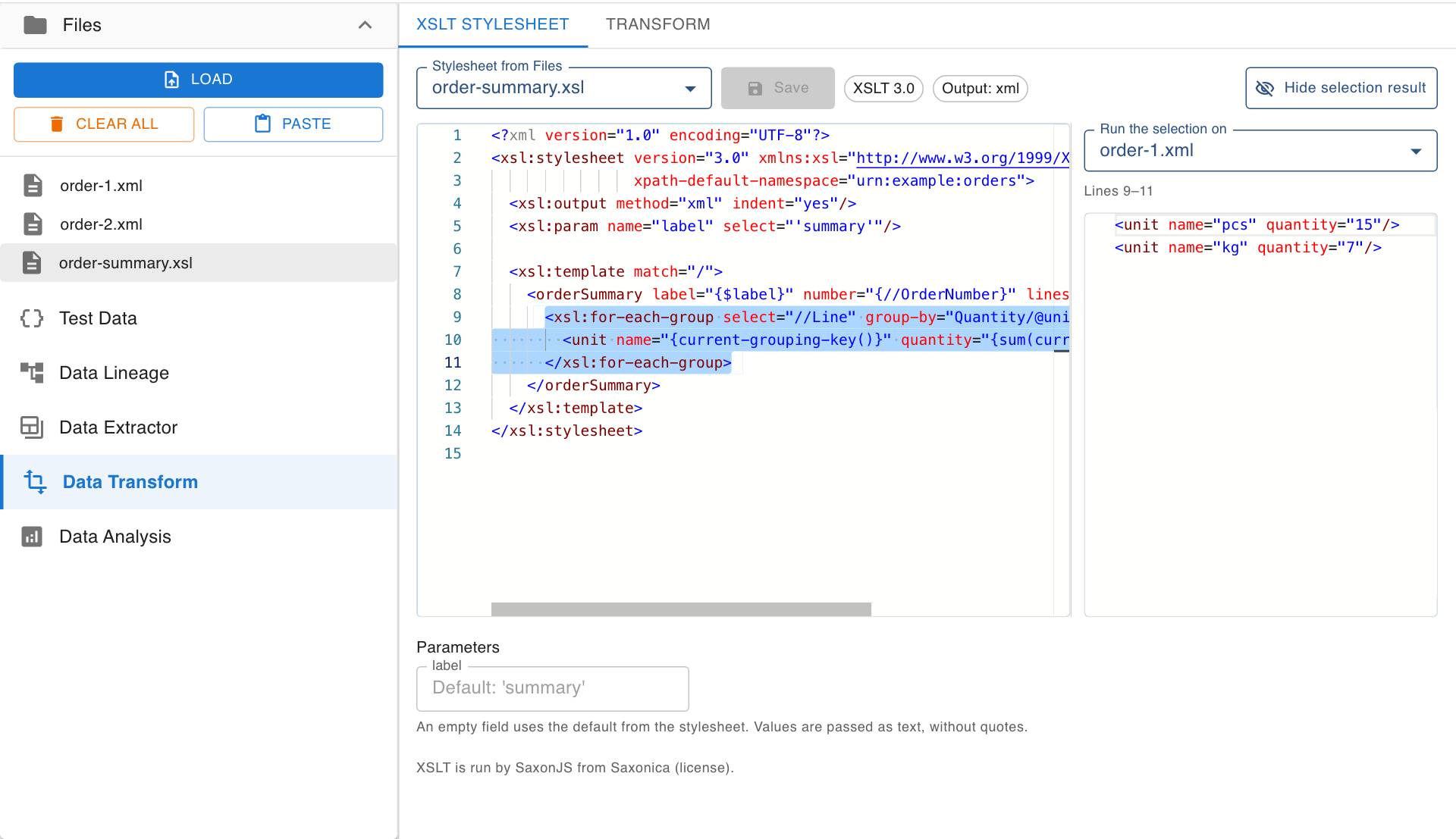
- The panel shows the elements, attributes and text the selection writes, once for every time the lines run.
- Select a variable to see its value.
- A selection that covers part of an instruction is widened to the whole instruction. With the whole stylesheet selected, the whole result is shown.
- Use Hide selection result to give the editor the full width.
The Transform Tab
- Files to transform: Choose one or more files, or a ZIP archive. For a ZIP, the number of XML files in it is shown.
- Preview: Choose which of the selected files to show. The input can be resized against the result or hidden with Hide input.
- File extension: Suggested from the output method of the stylesheet (for example
xmlortxt) and can be changed. - Also add the result to Files: Adds the transformed files to Files in addition to saving them, so that they can be viewed, compared or analyzed.
Results
- One file gives one file, with the name of the input and the chosen file extension.
- Several files give a ZIP with one result per input file.
- A ZIP archive gives a new ZIP with the same file names and folders.
- A summary under the button says how many files were transformed and reports files that failed.
XSLT Support
- XSLT 1.0, 2.0 and 3.0 are run by SaxonJS from Saxonica.
- Messages written with
xsl:messageare collected and shown.terminate="yes"stops the transformation of that file. - For privacy, a stylesheet cannot read other files or URLs.
Availability
Data Transform is free to use. Without registering you can load two files at a time and ZIP archives of up to 25 files. Beyond that you need to register, which is also free.