Generating test files from a template has a weak spot. Give the order lines random quantities and prices, and the order total in the same file is still the total of the template. A system that checks its input rejects the file, and the test says nothing about what you wanted to test.
The same goes for counts. A file with a LineCount of 3 and five lines is not valid test data, and a load test that needs orders with 1 to 50 lines could not be made from a template with three.
The Test Data Generator in Nodeflip now handles both, and can also set up the rules for you.
An Order Batch as an Example
A batch of orders, each with lines, a line count, a total and VAT:
<OrderBatch>
  <BatchId>3f2b8c1e-9a4d-4e7b-8c2a-1d5e6f7a8b9c</BatchId>
  <Created>2026-11-02</Created>
  <OrderCount>2</OrderCount>
  <TotalAmount currency="SEK">1840.50</TotalAmount>
  <Order>
    <OrderNumber>ORD-1001</OrderNumber>
    <OrderDate>2026-11-02</OrderDate>
    <Line>
      <LineNumber>1</LineNumber>
      <OrderRef>ORD-1001</OrderRef>
      <Quantity>2</Quantity>
      <UnitPrice>125.00</UnitPrice>
      <Amount>250.00</Amount>
    </Line>
    ...
    <LineCount>3</LineCount>
    <OrderTotal>850.50</OrderTotal>
    <Vat>212.63</Vat>
    <OrderTotalInclVat>1063.13</OrderTotalInclVat>
  </Order>
  ...
</OrderBatch>
Almost every value in it depends on another one. The goal is files where every order gets new numbers and its own lines, and where everything still adds up.
Let Nodeflip Suggest the Rules
Configuring a template used to mean going through it field by field. Suggest Rules, above the configuration tree, reads the values of the template and proposes a rule for each field it recognises:
- UUIDs get Generate UUID, in the same case and with the same prefix.
- Running numbers, like
ORD-1001orinvoiceNo, get Auto increment. Line numbers get Auto increment that starts over in each list. - Fields that repeat another field, like
OrderRefon every line, get a Reference Value, so they still match. - Dates become today, keeping their distance to the first date of the file.
- Totals, counts and amounts get the new behavior Calculate, described below.
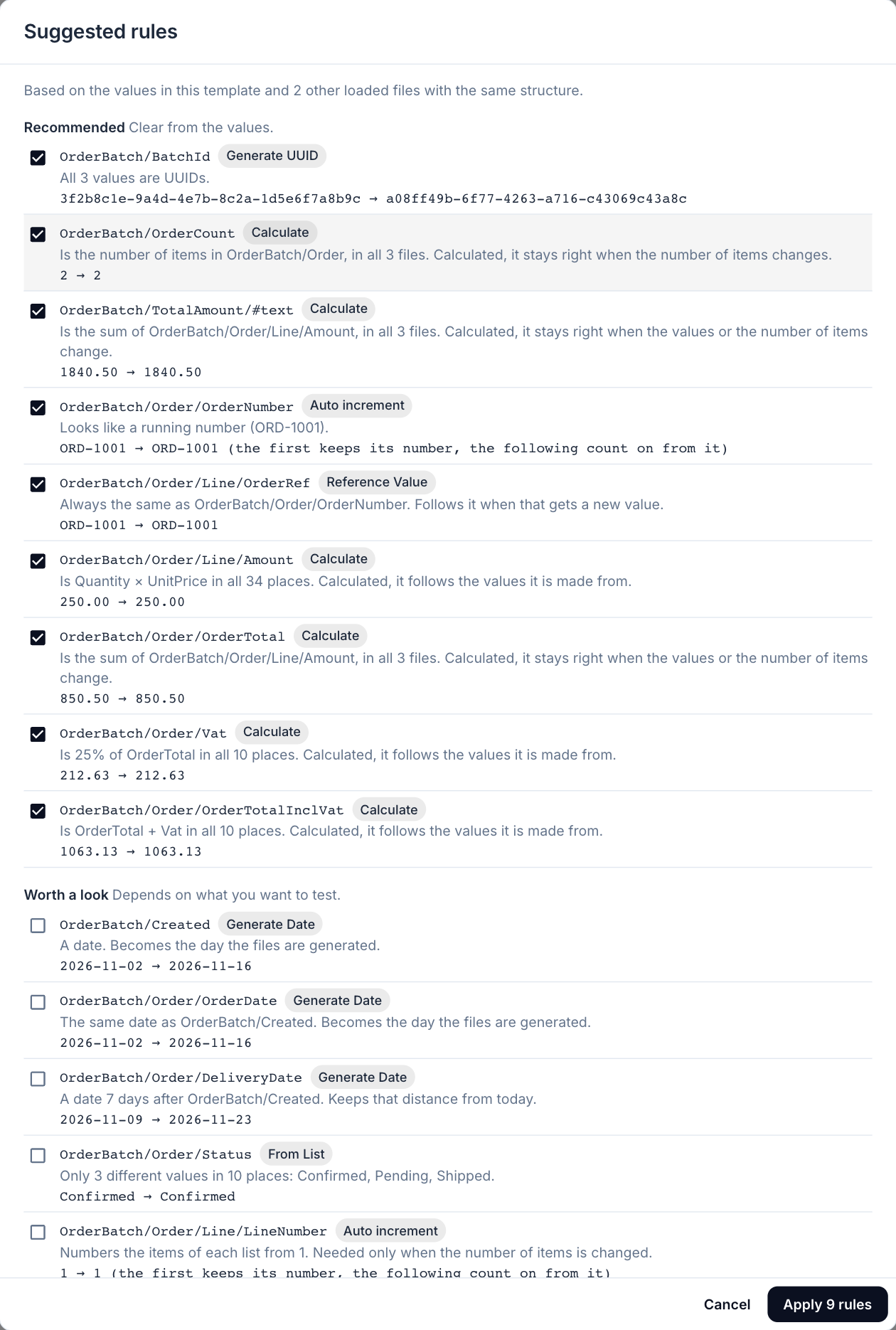
Nothing is applied until you have looked at it. Each suggestion shows what it was based on and what it turns the template’s value into. Suggestions with solid ground are ticked. Those that depend on what you want to test, such as dates, short numbers and IDs that may point outside the file (customerId, productId), are offered without a tick.
More files of the same kind give better suggestions. With a few real files loaded, or a ZIP of up to 500 of them chosen in the dialog, Nodeflip can tell a number that is the file’s own from one that only happens to look like it. A sum also has to hold in every file before it is suggested.
Give Every List the Number of Items You Want
Every list in the tree now shows its number of items as a chip. Click it to choose:
- A fixed number, such as 50 lines in every order.
- A random number between two, drawn anew for each list, so every order gets its own number of lines.
- A multiple of the template’s, such as ×100 for volume with the proportions of the template.
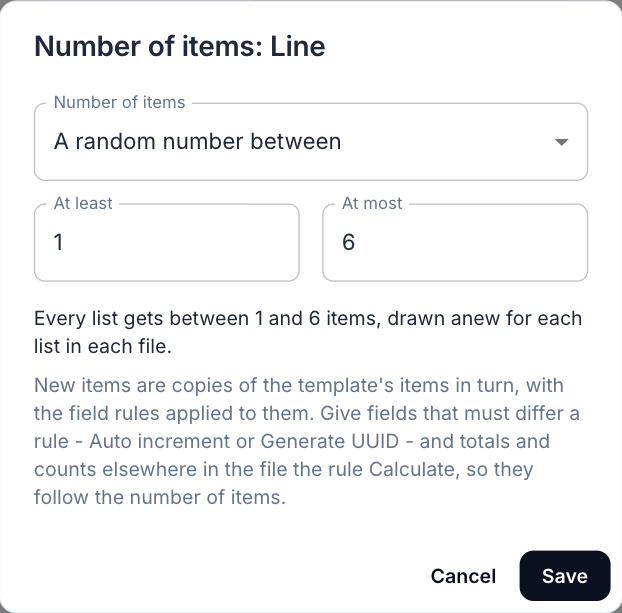
New items are copies of the template’s items in turn, with the field rules applied to them. An XML element that occurs once can be made a list with Repeat. Before you generate, Nodeflip estimates the size of the result and shows it under the button. A run that would give files over about 200 MB each, or 500 MB in all, is refused instead of attempted.
Totals That Follow the Lines
Calculate is a new behavior that works a field out from the generated values of other fields:
- Over a list: sum, count, average, lowest or highest.
OrderTotalis the sum ofLine/Amount,LineCountthe number of lines. - From the fields beside it: multiply, add, subtract, or a percentage.
AmountisQuantity × UnitPrice,Vatis 25 % ofOrderTotal.
A calculated field in a list is calculated for each item, so an order total sums the lines of that order, and a total above the orders sums all of them. Calculations can build on each other in any order: line amounts, order totals, VAT, the grand total of the batch.
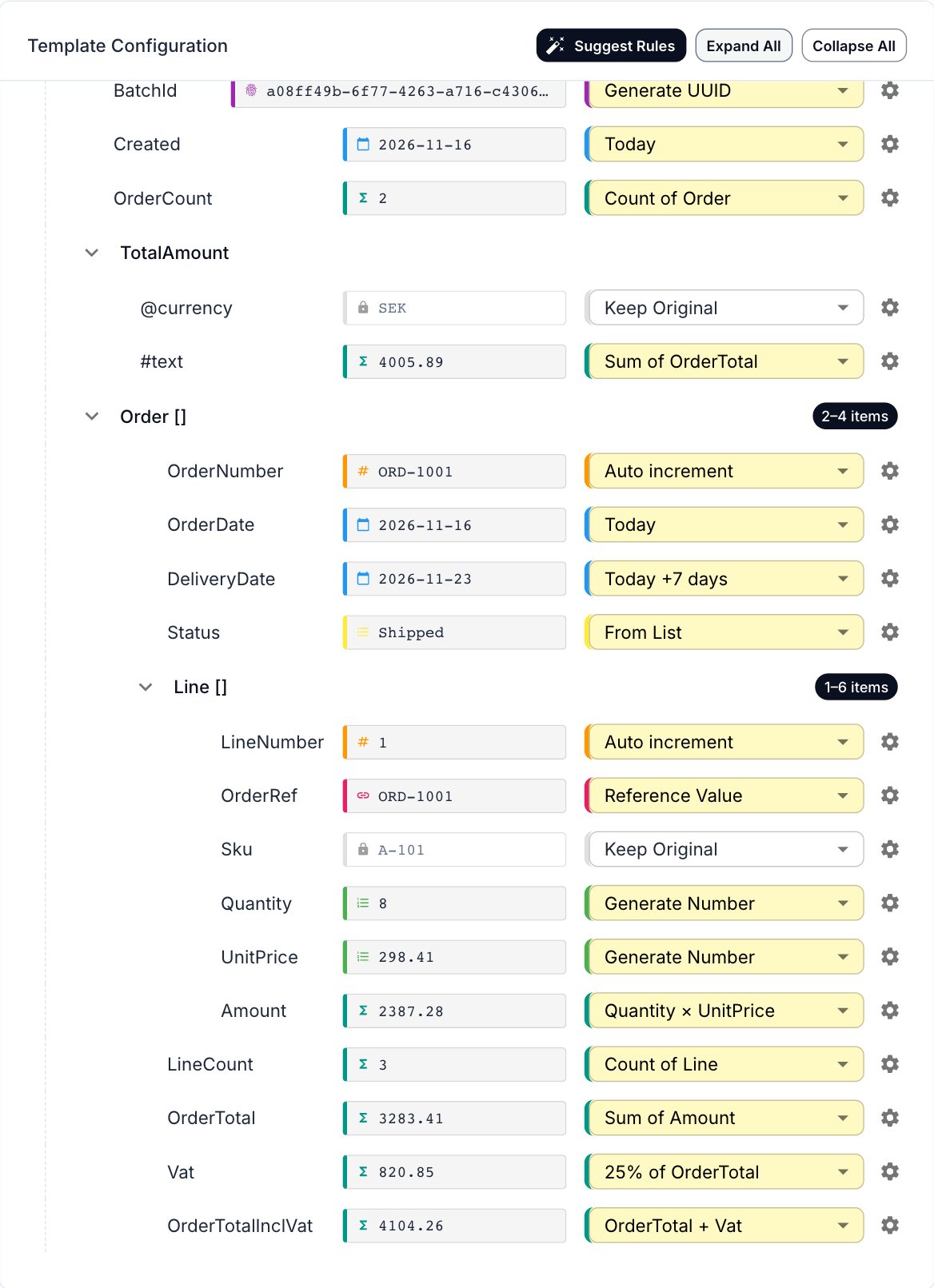
The result is written like the template value: 250.00 stays with two decimals, a decimal comma stays a comma, and rounding is done the way amounts are rounded.
One of the orders in a generated file, with four lines instead of three and new quantities and prices:
<Order>
  <OrderNumber>ORD-1005</OrderNumber>
  <OrderDate>2026-11-16</OrderDate>
  <Line>
    <LineNumber>1</LineNumber>
    <OrderRef>ORD-1005</OrderRef>
    <Quantity>10</Quantity>
    <UnitPrice>24.21</UnitPrice>
    <Amount>242.10</Amount>
  </Line>
  <!-- lines 2 and 3: 287.70 and 1298.29 -->
  <Line>
    <LineNumber>4</LineNumber>
    <OrderRef>ORD-1005</OrderRef>
    <Quantity>3</Quantity>
    <UnitPrice>76.13</UnitPrice>
    <Amount>228.39</Amount>
  </Line>
  <LineCount>4</LineCount>
  <OrderTotal>2056.48</OrderTotal>
  <Vat>514.12</Vat>
  <OrderTotalInclVat>2570.60</OrderTotalInclVat>
</Order>
The line numbers start from 1, the order reference follows the order number, and the count, the total and the VAT match the lines.
A Report Instead of Silence
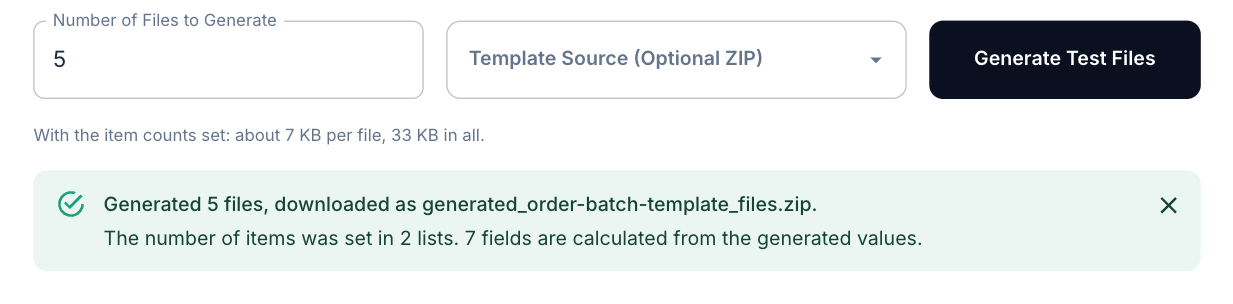
When the files are generated, a report says how many were made and where they went, and lists anything that did not go as planned: a template that could not be read, a script that failed, a reference to a field that does not exist. The same problems are marked on the field in the tree, and the preview in the tree now shows exactly what the first file will contain.
Fixes Worth Knowing About
Along the way, a number of settings now do what the dialog says:
- Dates: Increment Days and Today + Offset follow the number of days in the dialog, Random Between Dates works, and a fixed date is written in the chosen format. A date with time is ISO (
2026-11-16T09:30:00) by default. - Decimals: a decimal number in XML keeps its decimals, so
10.50is no longer written as10.5. - ZIP templates: files generated from a ZIP stay in the folder of their template.
- Configurations: a warning shows when a saved configuration has rules for fields the template lacks, and importing a configuration tells you when it contains scripts.
If you have saved configurations that use Today + Offset, check the generated dates: the stored offset is now applied, and the dialog used to store 1 day by default.
Nothing Is Uploaded
The template is often a copy of a production file. It is read and the files are generated in your browser, so neither the template nor the result is sent to a server.
Try It
Open Nodeflip, load an XML or JSON file, go to Test Data and click Suggest Rules. Every option is described in the Test Data documentation, and the earlier post on test data covers the basic behaviors and custom scripts.