A nightly batch of 20,000 files goes through, and three orders end up without a delivery date. The files look fine when you open a few at random, which is the problem: you would have to open thousands to find the three.
Data Analysis has always shown how many values of an attribute are null or empty. Since this month you can also click your way to which files they are in.
The (Null/Empty) Entry
When an attribute has files where the value is missing, null or empty, its value list now starts with a synthetic entry called (Null/Empty). It behaves like any other value: click it, and the analysis is filtered to exactly those files.
Three cases are covered by the same entry:
{ "order": { "id": "A-1001", "deliveryDate": null } }
{ "order": { "id": "A-1002", "deliveryDate": "" } }
{ "order": { "id": "A-1003" } }
In XML, an empty or self-closing element such as <deliveryDate/> counts the same way, and so does an element that is not there at all.
Step by Step
- Load the files, or a ZIP with all of them, and run Data Analysis.
- Open the structure and find the attribute, in this case
deliveryDate. The line under its name shows the number of null or empty values. - Click (Null/Empty) at the top of its value list.
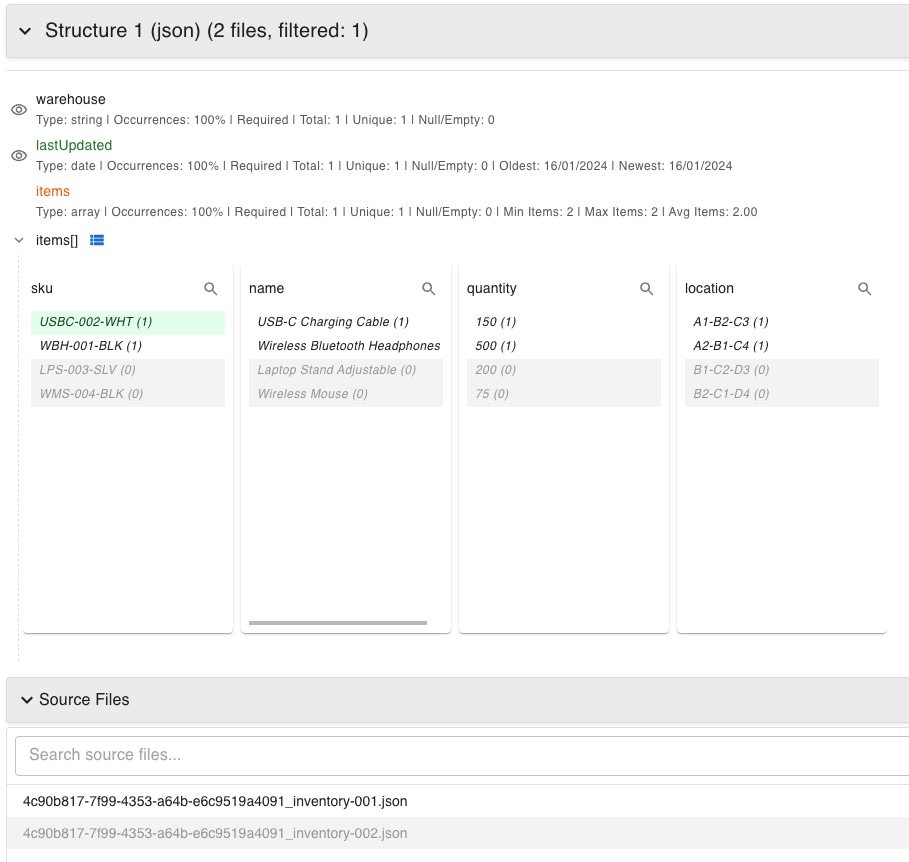
- The file count drops to the files with the problem, and Source Files lists them. Open one to see it in the file viewer.
Narrow It Down with More Values
A missing value is seldom random. With the filter in place, look at the other attributes: their value lists now only show what occurs in the filtered files. If all three files have the same sender, the same order type or the same creation hour, you have a lead.
To narrow further, select several values of another attribute at once:
- Drag across values to select a range.
- Hold Ctrl (or Cmd on Mac) and click values that are not next to each other. They are applied together when you release the key.
- Right-click the attribute and choose Filter multiple values to paste a list, for example forty order numbers from a support ticket. Values can be separated by new lines, commas, semicolons or tabs. This option was added in January.
That covers questions like “orders with no delivery date from any of these four warehouses”.
Export the Evidence
When the filter shows the files you were after, export them from the download menu. You get the original XML or JSON files, which is what the team that owns the source system needs in order to reproduce the problem.
Why Not Just Search the Files?
Searching for <deliveryDate/> or "deliveryDate": null finds two of the three cases if you get the spelling and whitespace right. It cannot find the file where the attribute is not there at all, because there is nothing to search for. Finding what is absent needs a tool that knows what the other files contain, and that is what the analysis gives you.
Read more about filtering in the Data Analysis documentation, or try it on your own files.